Insights on digital risk and
personal security
Digital risk is evolving quickly. For individuals and families with greater public presence, professional responsibility, or complex personal lives, digital exposure is often higher. The impact of a security incident can extend beyond inconvenience to affect privacy, reputation, and financial well-being.
%20(1).avif)
%20(1).png)

Featured articles
A small selection of articles that help readers stay informed about personal and executive digital risk.

What happened
A Calgary investor is suing TD Waterhouse Canada Inc. after fraudsters allegedly broke into his TD Direct Investing accounts while he vacationed in Hawaii.
According to The Globe and Mail, the intruders sold his holdings and poured more than $5 million into a thinly traded Hong Kong stock.
When it collapsed, he lost roughly $4.5 million in retirement savings.
TD says he either made the trades himself or failed to secure his account. Nothing has been proven in court, but the case shows how fast wealth can vanish once login credentials fall into the wrong hands.
Why this keeps happening
This isn't an isolated incident.
TD Bank has faced other serious regulatory scrutiny in recent years, and securities fraud attorneys continue to field claims from investors who say controls failed them.
Banks guard their own core systems closely, but the real weak points are often somewhere else: the client's personal devices, account passwords, and email accounts, all sitting outside the bank's oversight and controls.
Why travel makes you a target
It's worth pausing on the timing here: the alleged fraud happened while the investor was away in Hawaii. That's not a coincidence worth overlooking.
Vacations pull people out of their normal routines on purpose, and that's exactly what makes them good for rest, and terrible for security.
At home, most people have habits without even thinking about them: checking accounts over morning coffee, noticing a strange email between meetings, recognizing when something on a statement looks off.
Travel disrupts every one of those habits at once:
- You're on hotel or airport Wi-Fi, which is rarely as secure as your home network.
- You're checking email and banking apps quickly, often on borrowed time between activities, so a suspicious login alert can get skimmed past instead of read carefully.
- Time zone changes mean notifications may arrive at 3 am and get dismissed unread.
Many people intentionally "unplug" from their finances while traveling, treating vacation as a break from monitoring entirely.
Fraudsters understand this pattern well. Account takeovers cluster around known absences: holidays, long trips and/or business travel.
A window of even a few days without anyone watching an account closely is often all it takes to sell off holdings and move funds into a single volatile position, which is exactly what allegedly happened in this case.
None of this means people shouldn't travel or unplug — they should. It means the monitoring can't rely on the account owner remembering to check in from a beach in Hawaii.
Steps you can take right now
Basic habits, especially before and during travel, meaningfully reduce your own risk:
- Turn on multi-factor authentication for every brokerage, banking, and email account.
- Use a unique, strong password for each financial account — never reuse them.
- Avoid logging into financial accounts on public or hotel Wi-Fi while traveling.
- Set up account alerts for trades, withdrawals, and login attempts before you leave.
- Designate someone you trust to glance at statements while you're away.
- Review account activity closely in the days right after returning.
- Ask your brokerage about limiting or freezing margin trading if you rarely use it.
Where personal habits aren't enough
Even careful people get targeted, especially the moment they step away from their routine.
This is a gap Richter Guardian is built to close.
Corporate and bank-side security stops at the workplace door — it doesn't watch the personal phone, laptop, or email account a fraudster actually needs.
Richter Guardian's monitoring and prevention service watches continuously, including while clients travel, for compromised credentials and suspicious activity. If something looks wrong, clients aren't left to figure it out alone.
Our incident response team, the Cyber Defence Desk, is reachable via phone, email, video or a mobile app to explain what's happening and guide next steps.
The bottom line
Vacations should mean rest, not vigilance. For high-net-worth individuals and families with complex accounts and multiple devices, someone still needs to be watching while you're not. Protection shouldn't stop where your routine does.
Ready to stay protected from digital threats, with experienced professionals overseeing your security?
Request a private consultation to find out whether Richter Guardian is a good fit for you.

Cheaper Cyber Insurance, Costlier Risk: The Family Office Coverage Gap
The cyber insurance market is softening just as the threats driving demand for it accelerate.
Premiums are falling, yet more than 40% of cyber claims are now denied — most often because controls attested to on the application were never actually in place.
For family offices, with their informal governance and concentrated wealth, a cheaper policy is increasingly a policy that will not pay.
The defensible position for family offices is verifiable security controls, not a lower premium.
The market contradiction
Reporting from the Family Office Cybersecurity Forum in New York describes a market where competition is outpacing risk. New entrants including major carriers have pushed prices down, and average premiums were projected to fall a further 11% in 2026.
Buyers are being advised to shop around — but price is now the least important variable.
The frequency and severity of losses continue to climb even as rates drop, and the early signs suggest the rate of decline is starting to slow.
By the numbers
- ~50% of US family offices were hit by a cyberattack in 2025.
- 40%+ of cyber insurance claims are currently being denied — driven by missing controls, late notification and absent policy provisions, not exclusions.
- ~75% of carriers now run external attack surface scans during underwriting, replacing self-attestation.
- $713K average global ransomware claim in 2025 — nearly double the $374K recorded in 2024.
- 60% of family offices are confident their staff can detect and prevent AI-powered attacks.
- 2,137% rise in deepfake-driven fraud attacks since 2022; now 6.5% of all fraud.
Why family offices are uniquely exposed
Forum specialists characterized family offices as structurally vulnerable in ways that standard commercial cyber exposure does not capture.
The same traits that make a family office efficient make it exploitable:
- Cultures of informal approval and trust-based authorization.
- Heavy reliance on personal assistants and a small circle of staff.
- A bias toward speed over documented process.
- Multi-generational structures that widen the attack surface and blur accountability.
Layered on top is an AI-driven threat surface: deepfake voice impersonation of principals, AI-generated phishing, and business email compromise.
The FBI logged a 37% rise in AI-assisted BEC incidents using cloned executive voices, and attackers can now sit undetected inside a compromised environment for 100 days or more.
The regulatory squeeze
Family offices and their advisers face a tightening regulatory environment that mirrors what insurers already demand.
Amendments to the SEC's Regulation S-P took effect for smaller registered investment advisers on June 3, 2026, introducing a written incident response program, a 30-day customer breach notification obligation, and expanded vendor oversight.
The SEC's examiners have named S-P compliance a 2026 priority.
The controls the regulator now mandates are in most cases, the same controls cyber insurers require for a claim to be honored. One program satisfies both.
How Richter Guardian can help family offices
- Controls verification and attestation readiness — ensuring what you tell underwriters is true and evidenced.
- External attack surface assessment aligned to carrier underwriting scans.
- Regulation S-P alignment: written incident response program, breach notification readiness, vendor risk oversight.
- Human-layer defence against deepfake and AI-enabled social engineering, including principal and staff awareness.
- Ongoing managed monitoring so that controls stay in place between renewals.
Ready to stay protected from digital threats, with experienced professionals overseeing your security?
Request a private consultation to find out whether Richter Guardian is a good fit for you.

Understanding Business Email Compromise: Why Trusted Emails Still Need Verification
Business Email Compromise, or BEC, is a targeted scam in which a criminal impersonates someone you trust. They may pose as an executive, lawyer, vendor, advisor, employee, or family member and ask you to send money, change banking details, or share sensitive information.
The message may come from a lookalike email address or a real account that has been compromised. This can make the request appear normal and include details that only a trusted person would seem to know.
Executives, high-net-worth individuals and their families, and anyone able to move money or release sensitive information are valuable criminal targets. AI-written emails and voice cloning can make these scams even more convincing.
How it works
An attacker sends a message that appears to come from someone you know. It is designed to seem routine or urgent so that you act before confirming the request another way.
If a real email account has been compromised, the attacker may review conversations, invoices, contacts, and travel details. They can use this information to create a convincing request at the right time.
The risk works both ways. You may receive a fraudulent message, or your own account may be taken over and used to contact others in your name.
Why BEC is a major threat
According to the FBI Internet Crime Complaint Center’s 2025 Annual Report, BEC led to 24,768 reported complaints and more than $3 billion in reported losses in 2025. Only investment fraud caused greater reported losses that year.
BEC is also becoming harder to identify. AI can create professional messages without the spelling mistakes or awkward wording often linked to scams. Voice cloning may also make a call or voice message sound like someone you know.
Warning signs of business email compromise
Watch for:
- Urgency combined with secrecy
- New or changed payment or banking details
- A reply-to address that differs from the sender’s address
- A request that skips the normal approval process
- Pressure to move the conversation to text or WhatsApp
- An unusual request for sensitive information
A message from a compromised account may not show any of these signs. Verifying the request is more reliable than deciding whether the email looks suspicious.
How to protect yourself
Confirm every new payment instruction, banking change, or urgent transfer by calling the person directly. Use a number saved in your contacts, shown on a previous statement, or obtained from another trusted source.
Never use a number provided in the same email as the request.
During the call, confirm the payment amount, recipient, bank, account details, and reason for the transaction. Be especially careful if any information has changed.
Require approval from a second trusted person for payments above a set amount. Everyone involved should be expected to pause and verify a request, even if this causes a short delay.
Protect every email account including personal accounts, with a strong, unique password and multi-factor authentication. Keep recovery information current and check for unfamiliar forwarding rules, filters, connected applications, or signed-in devices. Do not reuse your email password on other services.
If you have been targeted
If you sent money or shared banking information, contact your financial institution immediately. Ask whether the payment can be stopped, recalled, or frozen. Keep the original emails, messages, and payment records.
If you believe your email account was compromised:
- Change the password from a trusted device.
- Sign out of other active sessions.
- Review the account’s security and recovery settings.
- Remove unfamiliar rules or connected applications.
- Notify anyone who may have received a fraudulent message from your account.
How Richter Guardian can help you
Richter Guardian can help reduce BEC risk by monitoring for exposed credentials and identifying impersonation attempts, including lookalike domains, websites, or accounts created in your name.
We can also help secure your accounts, review suspicious requests, and provide guidance if you believe an account has been compromised.
If you receive a suspicious email, payment request, banking change, or request for sensitive information, contact us before taking action.
Ready to stay protected from digital threats, with experienced professionals overseeing your security?
Request a private consultation to find out whether Richter Guardian is a good fit for you.

Fraud Alert — CRA Data Breach Settlement Scams
On August 4, 2026, the claims process opened for a $8.7 million settlement of a class action against the Government of Canada.
This covered people whose personal or financial information in a Government of Canada online account, including the Canada Revenue Agency portal, was accessed without authorization in 2020.
KPMG is the court appointed administrator, and eligible class members can submit claims online or by mail until February 3, 2027.
The settlement is legitimate, but the publicity around it is exactly the conditions fraudsters look for:
- A national news story
- A real government linked payout
- A real deadline
- A real administrator asking people to enter a last name and the last three digits of a Social Insurance Number on a website
That combination gives criminals a credible pretext to build convincing fake eligibility checkers and claim portals, and to harvest identity data and account credentials at scale.
Our expectation
A wave of phishing email, SMS, social media advertising, sponsored search results, and voice calls impersonating KPMG, the CRA, the Federal Court, and class counsel, beginning within days of the news coverage and continuing through the February 2027 claim deadline.
The only legitimate channels and what to watch for
Official settlement website
https://www.breachsettlementcanada.kpmg.ca (English and French). This is the court appointed administrator's website.
Official email address
breachsettlementcanada@kpmg.ca
What the real eligibility check asks for
- Last name
- Last three digits of the SIN
- An email address
- Nothing more at the eligibility stage
What the real process NEVER asks for
- Full SIN
- Date of birth
- Banking credentials
- CRA My Account user ID or password
- A multi factor authentication code
- A credit card number
- A copy of a government ID uploaded to a chat window
- Any payment or fee. There is no fee to file a claim
Anything arriving by unsolicited text, direct message, or phone call that pushes you toward a different address, a shortened link, or an app download should be treated as fraudulent until proven otherwise.
What the fakes will look like
The following mock ups were produced by Richter Guardian for training purposes.
These are not real messages and the addresses and links shown are illustrative only.
Share them with your household, your office staff, and anyone who manages correspondence on your behalf.
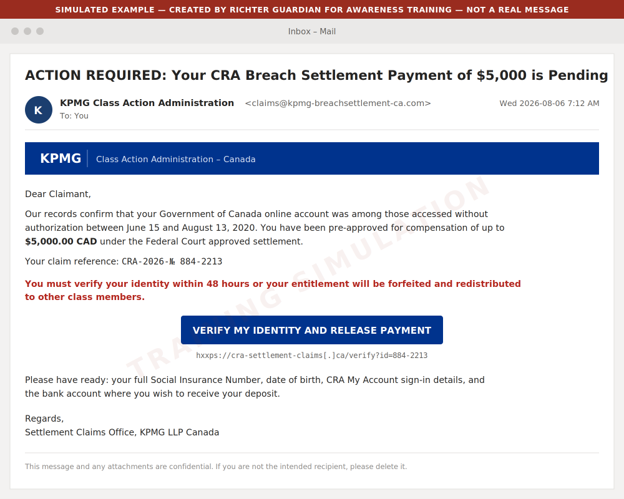
Example 1: Phishing email impersonating the claims administrator

What to watch for
- Look-alike sender domain rather than https://www.breachsettlementcanada.kpmg.ca
- A pre-approved dollar figure the real administrator would never quote up front
- A 48 hour forfeiture threat against a deadline that is actually February 3, 2027
- A request for the full SIN
- CRA sign-in details
- Banking information
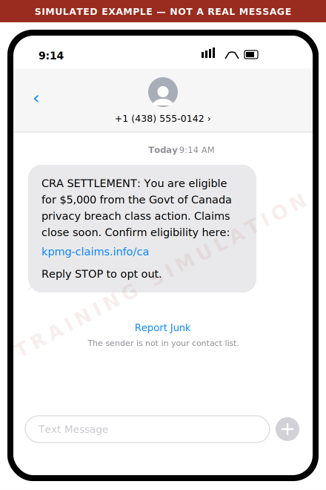
Example 2: Smishing text message

What to watch for
- The administrator does not solicit claims by text message
- The domain is not kpmg.ca
- The amount is presented as guaranteed
- Urgency is manufactured
Legitimate class action notice arrives by mail or from the administrator's own address.
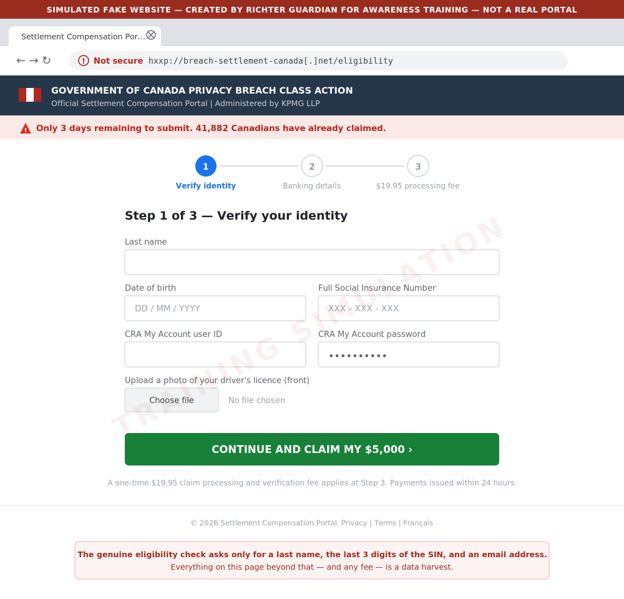
Example 3: Fake eligibility and claim portal

What to watch for
- An unencrypted look-alike domain
- A full SIN and CRA credentials requested where the real site asks only for a last name
- Three SIN digits
- An email address
- An ID upload
- A processing fee where the real claim is free
- False scarcity counters
Criminals also buy sponsored search advertisements so these pages appear above the real one.
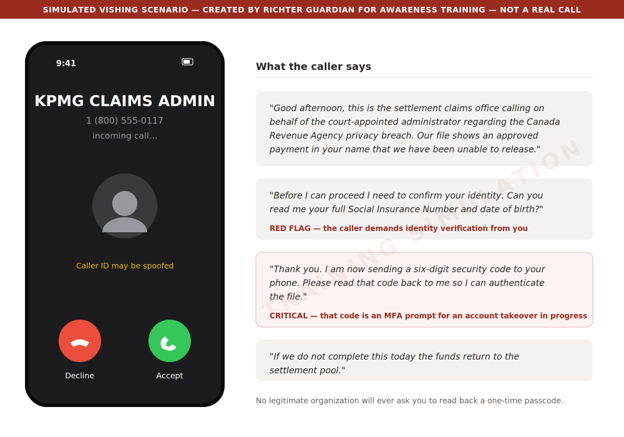
Example 4: Voice call and voicemail pre-text

What to watch for
- An inbound unsolicited call
- Identity verification demanded by the caller rather than by you
- Above all, a request to read back a code sent to your phone. That code is a multi factor authentication (MFA) prompt for an account the caller is trying to take over at that moment. No legitimate organization will ever ask for it
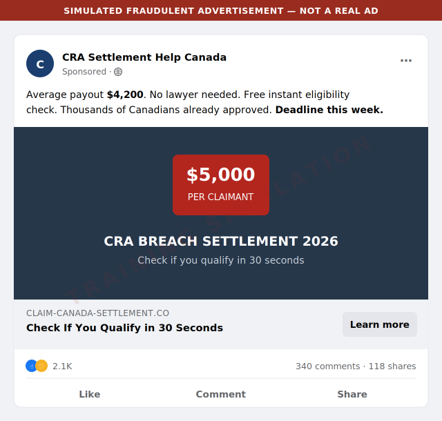
Example 5: Social media and search advertising

What to watch for
- An invented average payout
- A fabricated deadline
- A paid placement above the genuine result
Reach the administrator by typing the address directly - https://www.breachsettlementcanada.kpmg.ca - rather than by clicking any advertisement or search result.
Red flags to brief your household and staff on
Unsolicited contact
The administrator contacts class members by mail or from its own domain. It will not cold call, text, or direct message you.
A guaranteed amount up front
Real compensation is up to $80 or up to $200 for time spent, plus up to $5,000 in documented out of pocket costs, and amounts may be reduced depending on how many claims are approved. Nobody can promise you $5,000.
Artificial urgency
The real deadline is February 3, 2027. Any message giving you 24 hours, 48 hours, or "this week" is manufacturing pressure.
Over collection of identity data
The genuine eligibility check asks for a last name, the last three digits of your SIN, and an email address. A request for the full SIN, date of birth, ID scans, or CRA credentials is a data harvest.
Any request for a fee
Filing a claim is free. A processing, verification, or expedite fee means fraud.
Any request for a code
A one time passcode read aloud, forwarded, or typed into a third party site hands over your account.
Look-alike domains
Check the address carefully. The genuine site is https://www.breachsettlementcanada.kpmg.ca.
Anything ending in .info, .net, .co, .ca-claims, or a hyphenated variant of the KPMG name is not it.
Payment by unusual method
Requests to move funds, buy gift cards, or receive a payout through e-transfer to a new recipient are not part of any settlement.
What we recommend you do
For principals and family members
Type the address, never click
Reach the eligibility check only by typing https://www.breachsettlementcanada.kpmg.ca into the web browser. Do not use links from email, text, social media, or search advertisements.
Verify by calling back
If someone claims to be the administrator, hang up and contact breachsettlementcanada@kpmg.ca from the details on the official site.
Treat the SIN as a credential
Never provide a full Social Insurance Number to an inbound contact.
Check your CRA account directly
Sign in to CRA My Account by typing the address, confirm your direct deposit details and mailing address have not been changed, and enable multi factor authentication if it is not already on.
Consider a credit file alert
If you believe your information was exposed, place a fraud alert with Equifax Canada and TransUnion Canada.
For family offices and business staff
Brief your team this week
Forward or print this email to anyone who handles correspondence, banking, or tax filings on a principal's behalf.
Add a verification step
Any instruction arising from a settlement, refund, or government notice must be verified by an out of band call to a known number before any data or funds move.
Watch for lookalike domains
Ask your IT provider to monitor for newly registered domains that combine your family or firm name with settlement, claim, refund, or CRA terms.
Tune your email filtering
Quarantine newly registered sender domains and flag external mail referencing CRA settlements or class action payouts.
Report and preserve
Report suspected scams to the Canadian Anti-Fraud Centre at 1-888-495-8501 and preserve the original message headers rather than deleting them.
If you think you've already been caught
Move quickly
Change the password on any account whose credentials were entered, starting with CRA My Account and your email, and revoke active sessions.
Call the CRA
If CRA credentials were disclosed, contact the CRA immediately and ask that the account be locked and reviewed for changes to direct deposit or address.
Notify your bank
Report the exposure and ask for enhanced verification on outbound payments.
File a credit alert
Contact Equifax Canada and TransUnion Canada.
Contact Richter Guardian
Speak to your Richter Guardian team. We can help contain the incident, assess what was exposed, and coordinate monitoring.
Ready to stay protected from digital threats, with experienced professionals overseeing your security?
Request a private consultation to find out whether Richter Guardian is a good fit for you.

Why Richter Guardian's Digital Executive Protection Works Like a Home Security System
Most families already understand physical home security. A monitored home security system watches the doors, the windows, and the driveway, and it alerts a real person the moment something looks wrong.
Few high-net-worth families would consider their primary residence unprotected in this way.
Yet the equivalent protection is often missing for the digital side of an executive's family life, where far more of their exposure now lives: within personal email accounts, mobile phones, computers, social media profiles, and financial credentials.
Richter Guardian is built around the same underlying idea as a home security system, just applied to a family's digital footprint.
It is worth walking through the comparison directly, because it makes clear what "protection" should include.
Sensors on every door and window, not just the front entrance
A home security system is only as strong as the size of its coverage. A system that only watches the front door leaves every other entry point open. This is why home security systems place sensors on every window, every door, and often the garage too.
Richter Guardian applies this same principle to an executive's digital life on the home and family front. Personal digital protection means every meaningful entry point is covered, not just the obvious one. This includes:
- Personal laptops, tablets and phones, which are frequently the least protected devices in a household.
- Personal and family email accounts, often the single most valuable target since they often double as the recovery method for banking and investment accounts.
- Social media accounts, which can be cloned or impersonated to reach family members, friends, or staff.
Just as an unmonitored side window undermines a home security system's front-door sensor, one unprotected personal device or account can undermine protection everywhere else.
24/7 monitoring, not a sign in the yard
A home security sign discourages some opportunistic activity, but it does not stop a determined intruder, and it certainly does not respond to one.
The value of a real home security system comes from continuous monitoring: sensors that are always active and a monitoring center that is always watching.
The digital equivalent is continuous monitoring for leaked credentials, impersonation, and malware:
- A stolen password sitting on the dark web is like a duplicated house key sitting in a stranger's pocket. It does nothing on its own, but it becomes dangerous the moment someone decides to use it.
- Ongoing dark web and credential monitoring means that exposure is caught before it turns into a break-in, rather than being discovered only after money or data is already gone.
Monitoring that connects you with a real person, not just an app that pings you
When a home alarm is triggered, the value isn't only the alert. It's what happens next.
A monitoring centre verifies the situation and, if needed, contacts emergency services on the homeowner's behalf. Compare that to a security system that simply sends a phone notification and leaves the resident to figure out what to do.
With Richter Guardian, when an issue arises or clarification is required, our concierge support team contacts you in a secure, private and discreet manner. You can also contact us at any time. Either way, communication takes place through the Guardian mobile app, a phone call, or another agreed-upon channel.
Our Guardian professionals, also known as the Cyber Defence Desk, explain what’s happening in clear language and guide next steps in a way that fits into your broader wealth and risk strategies.
This matters most in the moment it's needed: when there's a convincing call, a strange pop-up, or an unexpected wire request.
When you know exactly who to speak with, and have those questions be answered by a real person, is the difference between a contained incident and a costly one.
Motion sensors around the perimeter, not just the locks
Good home security doesn't rely on locks alone. It adds motion sensors, cameras, and perimeter alerts, so that suspicious activity is noticed even if no door has actually been breached yet.
The digital version of this is reputation and identity protection. A cloned social media profile or an impersonation attempt is a form of activity around the perimeter of a family's digital life, well before any account can be compromised.
Monitoring for that activity, and acting on it early, is what keeps a small warning sign from becoming a full-blown incident involving fraud or reputational harm.
Covering every household under one family's roof, not just one address
Here is where the comparison becomes especially important for high-net-worth families with more than one residence, or with members living in different homes altogether.
A homeowner with a vacation property, or an adult child in a separate residence, would not consider that second home "covered" by the security system installed at the primary address. Each home needs its own protection.
The same is true digitally, and it is often overlooked.
A family's digital exposure does not stop at one address. It follows every family member:
- the adult child at university;
- the parent living independently; and
- the staff working across more than one property.
Each of these people and their accounts and devices represents a separate point of exposure, and each needs to be covered on its own, not assumed to be safe because "the family" has security somewhere.
This is why Richter Guardian's approach extends coverage across the full footprint of a family, not just one principal or one property.
Extended visibility across multiple households means that a family member living somewhere else entirely is not left outside the perimeter simply because they aren't under the same roof.
The value of thinking about digital executive protection this way
None of this is meant to suggest that digital executive protection and home security are the same thing, because they aren't.
The underlying logic that makes a home security system worth having is exactly the logic that should apply to a family's digital exposure: full coverage, continuous monitoring, a real response when something goes wrong, and protection that follows every member of the family, not just one address.
Families who wouldn't leave a single window unmonitored at home are, in many cases, leaving several digital windows wide open without realizing it.
Ready to stay protected from digital threats, with experienced professionals overseeing your security?
Request a private consultation to find out whether Richter Guardian is a good fit for you.

Protecting Against Real Estate Wire Fraud
Introduction
Real estate wire fraud is a scam where criminals impersonate trusted parties to redirect money during a property transaction.
These transactions often involve large wire transfers, and time-sensitive communication between buyers, sellers, lawyers, real estate agents, title companies, notaries, and financial institutions.
Together, these factors make real estate transactions a prime target for fraud.
For high-net-worth individuals, and executives, the risks can be especially significant.
Property purchases and sales may involve large sums of money, multiple advisors, and sensitive personal or financial information. A single fraudulent email or payment can lead to substantial financial loss.
The most important rule is simple: before sending money, always verify wire instructions by phone using a trusted number you already have, not one provided in an email.
Why it matters
Real estate transactions remain a major target for fraud. In 2025, the FBI’s Internet Crime Complaint Center reported more than 12,000 real estate fraud complaints and over $275 million in reported losses. This was higher than 2024, when losses were about $173 million.
These losses show how common and damaging real estate fraud can be. In many cases, the victim believes they are sending funds to a legitimate party, only to discover that the money was redirected to a fraudulent account.
How the attack works
Attackers often begin by gaining access to an email account involved in the transaction or by impersonating one of the parties. They may silently monitor the conversation and wait for the right moment to intervene.
Once attackers understand the details of the deal, they send a convincing email with fraudulent bank details that redirect the money to the attacker. Attackers may impersonate any party involved in the transaction, such as a real estate agent, lawyer, title company representative, or even the buyer or seller themselves.
Because the attacker may know specifics like dollar amounts, property addresses, and names of people involved, the message can look legitimate, making the email extremely convincing.
How to protect yourself
The most effective protection is independent verification. Before sending any wire transfer, call the intended recipient using a trusted phone number that was provided in person, saved previously, or found through an independently verified source.
Do not rely on contact information included in an email containing wire instructions. If an attacker controls the email conversation, they may also provide a fake phone number to “confirm” the fraudulent details.
This is especially important as AI voice cloning becomes more convincing. A phone call is only useful if the number is trusted. When in doubt, use a number you already know or independently verify the number through an official website or previously established contact.
The same approach should be used for any high-value payment, account change, or request involving sensitive financial information.
Red flags to watch for
Be cautious of:
- Last-minute changes to wire instructions
- Pressure to wire immediately
- Email addresses that look slightly off, such as ‘titlecompany.co’ instead of ‘titlecompany.com’
- Request to confirm payment details only via email
- Unusual urgency, secrecy, or changes in communication style
- New bank account details that were not previously discussed
However, a well-crafted attack may not include any obvious warning signs. Rather than trying to decide whether an email “looks suspicious”, treat all wire instructions as unverified until they are confirmed by phone using a trusted number.
Before sending a wire transfer
Before sending funds, take these steps:
1. Confirm the wire instructions by phone using a known, trusted number.
2. Verify the recipient's name, bank name, account number, routing number, and payment amount.
3. Do not use phone numbers or links provided in the same email as the wire instructions.
4. Be especially cautious about last-minute changes.
5. If anything feels unusual, pause the transaction and contact your advisor, bank, or security team.
How Richter Guardian can help you
Richter Guardian can help reduce the risk of wire fraud through proactive monitoring, personal cybersecurity guidance, and expert support to secure accounts, devices, credentials, and identity-related information.
If you are unsure about a transaction, receive suspicious payment instructions, or want added protection before a high-value transfer, contact us.
Ready to stay protected from digital threats, with experienced professionals overseeing your security?
Request a private consultation to find out whether Richter Guardian is a good fit for you.
Browse by topic
Explore articles based on areas of risk and responsibility.
Latest articles
New articles and updates from the Richter Guardian team.

Protecting Against Technical Support Fraud
Introduction
Cyber criminals have been carrying out technical support scams for over a decade. As technology evolves, so do the techniques of fraudulent tech support scammers, making it difficult for people to discern whether the technical support team they’re speaking to is legitimate. Technical support scams are so common that the FBI’s Internet Crime Report of 2022 reported that ‘Tech Support Crime’ had over 30,000 recorded victims in 2022.
Summary of a technical support fraud
Technical support scammers use many different techniques to trap people and gain access to their computers and other devices. After they convince you that there is a problem, they request an exorbitant fee in return for their help. Here are two of the most common methods technical support scammers use to trick their victims:
- Phone calls, emails and text messages – Technical support scammers may call, email or send a text message and pretend to be a computer technician from Apple, Microsoft, or any well-known technology company. They will assure you that there is a problem with your computer, and request that you give them remote access to your computer to help remediate the issue.
- Pop-up warnings – Technical support scammers may trick you with pop-up windows; it may look like an error or warning message from your device, and it may use similar graphics from trusted websites. The pop-up will often provide a phone number that you can call to get help. The phone number will lead to a fraudulent tech support worker.
Recommendations
- Stay Informed – Always be skeptical of unsolicited calls, emails or text messages that report a problem with your device.
- Prevent Remote Access – When a technical support scammer has you on the line, they will convince you to provide them remote access to your device in order to run diagnostic tests. Do not provide remote access to your device.
- Trust Your Instincts – If you are suspicious about an unexpected message, call, or request for personal information or money, it is safe to assume it may be a scam.
- Stay Educated – Participate in security awareness sessions provided by your Richter Guardian team, your bank or other trusted organizations.
We understand that misleading pop-ups or warnings about your device through a call can cause uncertainty. Richter Guardian’s monitoring system and concierge service can give you peace of mind.
Your onboarded mobile and endpoint devices can be monitored by us. If there is a problem with your device, we will contact you to provide specific details about any potential alerts. Our experts can help you remediate the issue.
Ready to stay protected from digital threats, with experienced professionals overseeing your security?
Request a private consultation to find out whether Richter Guardian is a good fit for you.

Travelling and Social Media – How To Keep Safe
Introduction
It’s natural to want to capture the moments from your special vacations and share them on platforms like Facebook and Instagram with family and friends. However, posting these photos while you are still on your trip can expose you to various cybersecurity risks. Cybercriminals often exploit social media to gather information about your travel plans, and by sharing your vacation in real time, you may unknowingly make yourself a target.
How to enhance your security on vacation
By following these precautions, you can enjoy your vacation while minimizing the risks associated with social media sharing:
- Set Your Account to Private: Restrict access to your personal information by sharing only with people you know. Public settings allow anyone to view your posts, potentially putting you at risk.
- Decline Requests from Unfamiliar Individuals: Be cautious when receiving friend requests from strangers. Unfamiliar profiles might be cybercriminals in disguise, aiming to extract money or steal your identity.
- Avoid Posting Travel Details or Itineraries: Keep your travel arrangements private. Sharing confirmation numbers for hotel reservations, airline tickets, or excursions online can provide cybercriminals with valuable information they can exploit.
- Share Photos After Returning Home: Although it may be tempting to post in real-time, consider waiting until you’re back home. You can still share your vacation highlights, and it’s a safer approach.
- Educate Your Children on Social Media Safety: While you might be aware of how to stay safe online, your children might not. Ensure they understand the importance of secure sharing practices during and after the trip.
Ready to stay protected from digital threats, with experienced professionals overseeing your security?
Request a private consultation to find out whether Richter Guardian is a good fit for you.

Apps and Location Tracking: What Are the Consequences?
Introduction
Of the many digital traces we leave in daily life, location metadata may be the most revealing. Location tracking is common in many applications because it’s so useful – it can allow you to get directions from here to there, discover the closest restaurants near you, or tell you your local weather conditions. These perks, however, can come with large privacy risks.
Companies that you would never suspect needing so much of your data, are quietly collecting enormous amounts of data. For example, in 2020, an investigation was done on Tim Hortons, as the Tim Hortons app reportedly tracked an individual’s location more than 2,700 times in five months. Commissioners say Tim Hortons collected “vast amounts” of granular location data with the aim of delivering targeted advertising, to better promote its coffee and associated products, but that it never actually used the data for this purpose.
Some of the apps on our phone sell or share location data about their users with companies that analyze the data and sell their insights. There are many ways location data can be used, and the market for this data is huge – the location data industry is an estimated $12 billion market. Collectors, aggregators, marketplaces, and location intelligence firms are potential buyers interested in your location data.
What is being collected?
Some apps genuinely need your location to work properly, but others have different motives. Many collect location data for reasons unrelated to their main function, like targeted ads or selling it to data brokers.
Once an app collects your location data, you lose control over where it goes. It can be sold repeatedly—from data providers to aggregators that combine information from multiple sources. It could end up in the hands of a “location intelligence” firm that uses the raw data to analyze foot traffic for retail shopping areas and the demographics associated with its visitors.
You might think, “I have nothing to hide.” But location data can reveal much more than you realize, such as:
- Where you get medical treatment and what kind
- If you visit a domestic abuse shelter
- Where you worship
- Where your kids play (if they have phones)
- When you’re on vacation and where you go
- Where you shop, eat, and bank
- Who you spend time with
Even though this data isn’t directly linked to your name, experts have shown that it’s easy to match location history with other data to identify people and their habits. In 2020, a religious publication used smartphone app data to infer the sexual orientation of a high-ranking Roman Catholic official. The publication claimed it obtained “commercially available” location data from an unnamed vendor and linked it to the priest’s phone, revealing visits to gay bars and private residences while using Grindr, a dating app popular with the LGBTQ+ community.
Privacy advocates have long cautioned that advertisers gather location and personal data, which is then compiled and sold by data brokers. This information can be used to identify individuals and is not subject to regulations requiring clear consent from those being tracked.
What can I do to limit location tracking?
The quickest and easiest way to reduce tracking is to delete unnecessary apps. Both Android and Apple allow you to check which apps have access to your location and whether they track it only while in use or all the time. If you don’t use an app often, consider removing it.
Your location can be tracked through your phone, logged-in accounts, internet connection, and location services. To limit oversharing, take these steps:
- Only allow location access for apps that truly need it.
- Set location permissions to “While Using the App” instead of “Always.”
- Only share “Find My Phone” with trusted friends and family.
- Review third-party apps in location settings—you might be sharing more than you realize.
Despite these precautions, location tracking can’t be completely eliminated. It’s important to support companies that provide clear and transparent privacy policies.
Ready to stay protected from digital threats, with experienced professionals overseeing your security?
Request a private consultation to find out whether Richter Guardian is a good fit for you.

What Are QR Codes and How Can You Stay Protected?
Introduction
A quick-response code (QR) is a type of barcode designed to store information in a way that digital devices can quickly read. Most modern smartphones come equipped with QR scanners, often integrated into the camera application, making scanning QR codes a breeze. The barcode is extremely versatile – it can be used as a shortcut to download applications, connect to wi-fi networks, open website links, and facilitate financial transactions. While QR codes serve many useful purposes, scammers have also found ways to exploit them.
According to reports from the Better Business Bureau (BBB) and police departments across the country, scammers are using QR codes to trick people into visiting fake websites, fraudulent payment portals, or downloading harmful software. Often, these scams come through unsolicited messages or from QR codes posted in public places.
How can I get scammed with QR codes?
Hackers can manipulate QR codes to conduct malicious activities. Here are a few examples:
- Parking Meter Payments: Scammers have been placing fake QR codes on parking meters, making people think they can pay for parking through the code. These fake codes are easy to create and print. After using them, some victims return to find they’ve been fined or towed, increasing their financial losses.
- Phishing Scams: Scammers use QR codes to lead people to phishing websites that ask for personal information, which can lead to identity theft. These codes can come via email, text, or on public flyers, often disguised as legitimate requests to verify your identity or account.
- Fake Utility and Government Notices: Scammers often pose as utility companies or other government agencies, claiming there’s an unpaid bill that needs immediate attention. They ask for payment through a QR code, which takes victims to a convincing fake website. Business owners have also reported receiving letters with QR codes, asking them to complete fake filing requirements.
- False Sense of Security: Scammers sometimes use real QR codes to make their schemes more convincing. For example, they might link to a legitimate website or fake employee profiles, using official logos and details to trick victims into trusting them.
Recommendations
By staying alert and verifying sources, you can protect yourself from falling victim to QR code scams. We recommend the following tips to avoid QR code scams:
- Verify Before Scanning: If you receive a QR code from a friend or colleague, confirm with them that they actually meant to send it. Be cautious if the message feels out of character.
- Be Cautious of Shortened URLs: When you hover your camera over a QR code, check the link that appears. If it’s a shortened URL, you won’t know where it leads, so proceed only if you’re confident the source is trustworthy.
- Look for Tampering: Scammers might alter legitimate QR codes by placing stickers over them. Keep an eye out for signs of tampering, and ask the business to verify the code if you notice anything suspicious.
Ready to stay protected from digital threats, with experienced professionals overseeing your security?
Request a private consultation to find out whether Richter Guardian is a good fit for you.

Using AI Tools Securely: ChatGPT, Gemini, and More
Introduction
AI-powered tools are now integrated into various platforms, from office software and operating systems to image editors and chat applications. But how can you use ChatGPT, Gemini, DeepSeek, and other AI-powered tools without compromising your digital security?
Avoid sharing sensitive information with AI chatbots
OpenAI’s privacy policy indicates that user data may be utilized to enhance AI performance. When using services like ChatGPT, Sora, or Operator, your interactions could be used to train AI models.
According to a study done by Harmonic Security, 8.5% of prompts contained sensitive information.
Never input sensitive personal information such as passwords, passport or banking details, addresses, phone numbers, names, or any confidential business data. If necessary, replace sensitive details with placeholders like asterisks or “REDACTED.”
For professionals, especially software engineers leveraging AI for code review, it’s crucial to strip out any information that could reveal company secrets and/or application structure.
Everything shared with an AI chatbot has the potential to be stored and analyzed.
Free AI services come with higher risks
Many free-tier AI tools explicitly state that they train on user data. Organizations using AI should consider investing in paid AI services like ChatGPT Enterprise, which ensures that user inputs and outputs are not utilized for training purposes.
Experts recommend paid plans as a more secure option for businesses looking to mitigate risks.
Best practices for safe AI use in the workplace
For businesses looking to integrate generative AI tools while minimizing security risks, Harmonic Security suggests shifting away from outright bans and instead implementing effective AI governance strategies. These include:
- Establishing clear AI usage policies and enforcing workflows.
- Monitoring AI tool usage in real time to track inputs and ensure compliance.
- Restricting the use of free AI tools that train on input.
- Classifying sensitive data to prevent exposure.
- Educating employees on responsible AI use and associated risks.
Ready to stay protected from digital threats, with experienced professionals overseeing your security?
Request a private consultation to find out whether Richter Guardian is a good fit for you.

Protecting Our Clients with Richter Guardian
The challenge
In our modern digital landscape, cybersecurity threats are an equal-opportunity challenge that can impact anyone, anywhere. As our world becomes more interconnected through technology, it’s crucial to recognize that cybersecurity isn’t just a concern for tech experts; it’s a shared responsibility that affects us all.
In one such case, a client found herself facing a daunting cybersecurity challenge. While browsing the internet, she received a pop-up message claiming that her computer was compromised by a virus. The message instructed her to call a specific number, which were impersonating Apple Support. Unfortunately, she fell victim to this scam, leading to a compromise of her computer.
The root cause analysis suggests that her computer might have been compromised during the installation of browser filters to block ads, where cybercriminals took possession of her computer system for 45 minutes. The client was distressed upon receiving a fraudulent invoice, wondering how this happened to her. This case study highlights the importance of cybersecurity and how Richter Guardian can offer a solution.
The solution
Richter Guardian, a comprehensive cybersecurity service offered by Richter, was instrumental in addressing this client’s situation. When the client reached out to Richter, our team quickly assessed the situation and took immediate action.
First, we onboarded the client to the Richter Guardian service, which includes social media protection, endpoint protection for devices (laptops, desktops, and mobile devices), and monitoring for compromised credentials on the dark web. This multi-layered approach ensured comprehensive protection for the client.
In addition to onboarding the client to Richter Guardian, we conducted a thorough analysis of her compromised computer. We also extended the protection to her mobile devices, ensuring her entire digital presence was safeguarded.
Furthermore, we educated the client on cybersecurity best practices, including the importance of strong, unique passwords and the use of two-factor authentication. We worked closely with her to ensure that her online accounts and data remained secure.
The result
The results of our intervention were significant. The client experienced several benefits from our Richter Guardian service:
Peace of Mind: The client no longer felt vulnerable to cyber threats. She gained confidence in her ability to navigate the digital landscape safely.
Device and Data Protection: All her devices, including her compromised computer, were fortified against potential threats. Her sensitive data was secure, and she no longer worried about cyberattacks.
Reputation Protection: Richter Guardian helped protect her online reputation by proactively monitoring for impersonation attempts and taking swift action to remove any fraudulent accounts.
Educational Insights: The client received valuable insights and recommendations to enhance her cybersecurity awareness. She learned how to recognize potential threats and avoid falling victim to scams in the future.
Ready to stay protected from digital threats, with experienced professionals overseeing your security?
Request a private consultation to find out whether Richter Guardian is a good fit for you.

23andMe User Data Stolen in Credential Stuffing Attack
Introduction
The public biotechnology and genomics firm, 23andMe, confirmed on their website on October 6, 2023, that certain 23andMe customer profile information was circulating on hacker forms. The information that has been exposed from this incident includes full names, usernames, profile photos, sex, date of birth, genetic ancestry results, and geographical location. As a result, 23andMe have notified their customers, and have pushed for them to reset their passwords and enable multi-factor authentication (MFA).
How the attack happened
The hackers used credential stuffing to gain access to a set of user accounts on 23andMe. Credential stuffing is a type of cyber attack in which a hacker uses stolen usernames and passwords (obtained from another breach or purchased off the dark web) to access other websites in which the users are registered. Users that recycled their breached login credentials on 23andMe may have been the entry point for this attack.
A subset of the compromised users opted into 23andMe’s DNA Relatives feature, which allowed for hackers to scrape the data of their DNA Relative matches.
The number of accounts affected has not been released or disclosed by 23andMe.
If you think you may have been affected by this recent breach, reset your password, and opt for MFA on 23andMe. While the account may or may not be compromised, it is important that cybercriminals do not leverage your breached credentials to access other websites in which you may have an account on.
How to stay safe
- Reset All Passwords – If you have the bad habit of reusing passwords across different websites, reset those passwords and employ hard-to-guess, complex passwords on those websites.
- Password Manager – To keep track of your complicated passwords, think about investing in a password manager. Password managers, like 1Password, place a secret key on your password manager to add a unique extra layer of security.
Richter Guardian can help you determine if some of your user accounts were involved in a previous breach. Our platform can determine compromised credentials through comprehensive dark web monitoring.
Sources
- “Addressing Data Security Concerns”. 23andMe. 2023 October 6. Retrieved 10 October 2023.
Ready to stay protected from digital threats, with experienced professionals overseeing your security?
Request a private consultation to find out whether Richter Guardian is a good fit for you.

Check-In Safely – Phishing Campaigns Target Hotels and Travel Agencies
Introduction
The tourism industry is crawling back to pre-pandemic numbers thanks to travel and lockdown restrictions being lifted globally. Unfortunately, cybercriminals have also come up with a new and sophisticated campaign to breach the systems of booking sites, hotels, and travel agencies. Subsequently, the cybercriminals use the systems of the compromised hotel or travel agency to send phishing emails to existing customers.
Summary of hotel and travel agency phishing scam
- The Entry Point – The campaign starts with the threat actor inquiring about a reservation with the hotel or travel agency. Upon booking the stay, the threat actor uses ‘advanced social-engineering techniques’ to inquire about specific or special accommodations.
- Tricking Employees – After establishing a sense of urgency with the hotel employee, the threat actor sends over a URL via email, which supposedly contains crucial documents relevant to their accommodations. The URL provided directs the hotel employee to a genuine hosting site (Google Drive, Dropbox, etc.) and the hotel employee downloads an archive file thinking that it contains important documents.
- Malicious Executables – The archive file that was downloaded by the hotel employee contained malicious executables (malware) that would infiltrate the hotel employee’s computer. From there, the malware operates stealthily to capture login credentials, financial information, and other sensitive data without the hotel employees being aware.
- New Target – Once threat actors have successfully compromised the hotel’s system, the threat actors can move onto using the hotel’s communication channel to target legitimate customers.
- Phishing – The threat actors can now send phishing messages disguised as legitimate requests from the compromised hotel or travel agency. The phishing messages will ask for additional credit card verification from the customer. Since the message comes directly from the booking site through a legitimate communication channel, the customer has no reason to doubt the legitimacy of the email.
How to stay safe
- Avoid Clicking on Unsolicited Links – Always be skeptical of unsolicited links, even when they originate from a trusted source. Check URLs for any indicators of deception.
- Take Your Time – Threat actors, phishing emails, and sketchy requests for payments will typically call for immediate action. Take your time to discern any emails that require you to transfer sensitive information.
- Trust Your Instincts – If you are suspicious about a suspicious email, call the hotel or travel agency directly to confirm that the communication is indeed legitimate.
Richter Guardian can help you navigate complex phishing scams. Your onboarded mobile and endpoint devices are protected; the protection service can detect suspicious links and will work to block insecure websites.
Ready to stay protected from digital threats, with experienced professionals overseeing your security?
Request a private consultation to find out whether Richter Guardian is a good fit for you.

BMO Scam Highlighting Vulnerabilities in Two-Factor Authentication
Introduction
A recent article published by CBC news highlighted a concerning scam that involved the Bank of Montreal (BMO). The scam managed to exploit vulnerabilities associated with the two-factor authentication (2FA) system of the bank. This advisory aims to provide an overview of the issue, its implications, and recommendations.
Summary of the incident
The scam primarily targeted customers with lines of credit. Perpetrators pose as bank employees and use a combination of phishing techniques and flaws in the 2FA process to gain unauthorized access to customers’ accounts, subsequently making unauthorized transactions.
Implications
- The trustworthiness of 2FA is at stake. Customers generally perceive 2FA as a robust security measure, but this incident underscores potential vulnerabilities.
- The scam demonstrates that even with the second layer of authentication, user accounts can be compromised if the process isn’t foolproof.
- Potential loss of customer trust in banking institutions due to such vulnerabilities.
Recommendations
- Stay Informed: Regularly update oneself about the latest scams and phishing techniques. Always be skeptical of unsolicited calls or emails asking for personal or banking information.
- Use Advanced Security Features: Wherever possible, use advanced security features like biometric authentication or hardware-based security keys.
- Monitor Accounts: Regularly check bank accounts for unauthorized transactions and report any discrepancies immediately.
- Stay Educated: Participate in security awareness sessions provided by your Richter Guardian team, the bank or other trusted organizations.
While 2FA is an essential security feature, it is not infallible. Richter Guardian clients should be proactive in understanding its limitations and continuously seek ways to enhance their security posture.
Contact us at anytime you are unsure. If you receive a call from someone purporting to be your bank and you are unsure, call us to help you determine the legitimacy of their communication.
Table 1 – Levels of two-factor authentication that may be available to protect your bank account.
Ready to stay protected from digital threats, with experienced professionals overseeing your security?
Request a private consultation to find out whether Richter Guardian is a good fit for you.

AnyDesk reports that hackers infiltrated its prodution servers and initiated password resets
Introduction
On February 2, 2024, AnyDesk confirmed a recent cyberattack that resulted in hackers gaining access to the company’s production systems. The breach involved the theft of source code and private code signing keys.
AnyDesk is a widely used remote access solution that is popular among enterprises for remote support and accessing colocated servers.AnyDesk became aware of the attack after they detected an incident on their production servers. Following a security audit, they identified a compromise on their systems and implemented a response plan in collaboration with CrowdStrike.
Following the disclosure of the breach, cybersecurity company Resecurity promptly announced that an individual is attempting to vend the credentials of over 18,000 AnyDesk customers on a well-known cybercrime forum. The seller is seeking $15,000 in cryptocurrency for the compromised credentials.
Implications and recommendations
Although AnyDesk claims that passwords were not stolen in the attack, the threat actors still managed to successfully breach their production systems.
- If you use AnyDesk, modify your password.
- If the same password for AnyDesk is employed on other platforms, modify your password on those platforms aswell.
f you receive a call from someone purporting to be technical support or receive a pop-up regarding the safety of your device and you are unsure, call us to help you determine the legitimacy of their communication.
Ready to stay protected from digital threats, with experienced professionals overseeing your security?
Request a private consultation to find out whether Richter Guardian is a good fit for you.
%20(1).png)
Have questions after reading?
If something you’ve read raises a concern, our team can help you understand how it applies to you. Richter Guardian provides ongoing monitoring and expert support for individuals, families, and leadership teams.
- Clear visibility into personal digital risk
- Guidance from experienced cybersecurity professionals
- Support designed for both private clients and enterprise leadership
%20(1).avif)
.png)