On August 4, 2026, the claims process opened for a $8.7 million settlement of a class action against the Government of Canada.

This covered people whose personal or financial information in a Government of Canada online account, including the Canada Revenue Agency portal, was accessed without authorization in 2020.

KPMG is the court appointed administrator, and eligible class members can submit claims online or by mail until February 3, 2027.

The settlement is legitimate, but the publicity around it is exactly the conditions fraudsters look for:

  • A national news story
  • A real government linked payout
  • A real deadline
  • A real administrator asking people to enter a last name and the last three digits of a Social Insurance Number on a website

That combination gives criminals a credible pretext to build convincing fake eligibility checkers and claim portals, and to harvest identity data and account credentials at scale.

Our expectation

A wave of phishing email, SMS, social media advertising, sponsored search results, and voice calls impersonating KPMG, the CRA, the Federal Court, and class counsel, beginning within days of the news coverage and continuing through the February 2027 claim deadline.

The only legitimate channels and what to watch for

Official settlement website

https://www.breachsettlementcanada.kpmg.ca (English and French). This is the court appointed administrator's website.

Official email address

breachsettlementcanada@kpmg.ca

What the real eligibility check asks for

  • Last name
  • Last three digits of the SIN
  • An email address
  • Nothing more at the eligibility stage

What the real process NEVER asks for

  • Full SIN
  • Date of birth
  • Banking credentials
  • CRA My Account user ID or password
  • A multi factor authentication code
  • A credit card number
  • A copy of a government ID uploaded to a chat window
  • Any payment or fee. There is no fee to file a claim

Anything arriving by unsolicited text, direct message, or phone call that pushes you toward a different address, a shortened link, or an app download should be treated as fraudulent until proven otherwise.

What the fakes will look like

The following mock ups were produced by Richter Guardian for training purposes.

These are not real messages and the addresses and links shown are illustrative only.

Share them with your household, your office staff, and anyone who manages correspondence on your behalf.

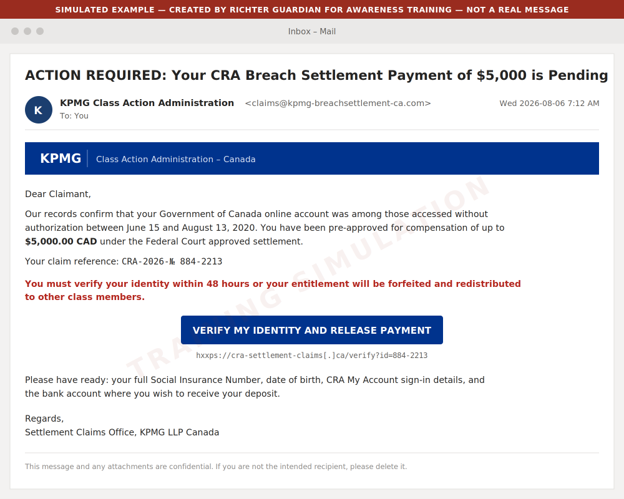
Example 1: Phishing email impersonating the claims administrator

What to watch for

  • Look-alike sender domain rather than https://www.breachsettlementcanada.kpmg.ca
  • A pre-approved dollar figure the real administrator would never quote up front
  • A 48 hour forfeiture threat against a deadline that is actually February 3, 2027
  • A  request for the full SIN
  • CRA sign-in details
  • Banking information

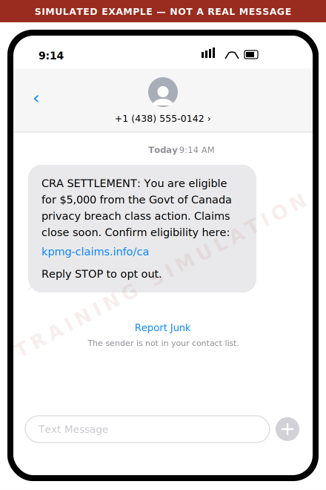
Example 2: Smishing text message

What to watch for

  • The administrator does not solicit claims by text message
  • The domain is not kpmg.ca
  • The amount is presented as guaranteed
  • Urgency is manufactured

Legitimate class action notice arrives by mail or from the administrator's own address.

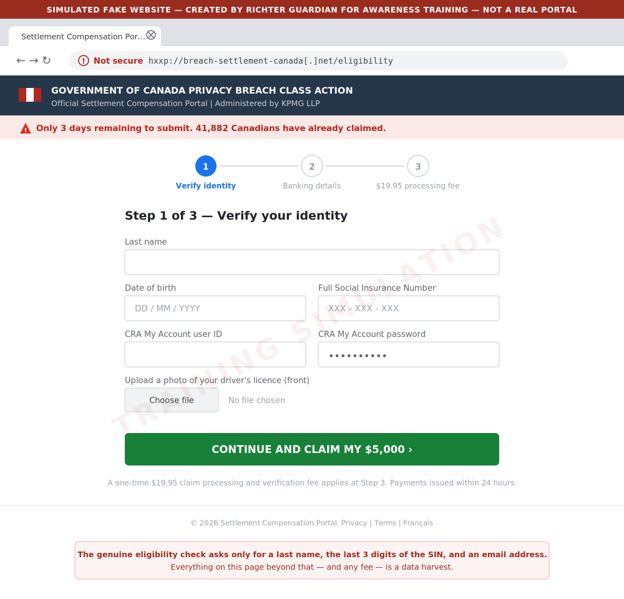
Example 3: Fake eligibility and claim portal

What to watch for

  • An unencrypted look-alike domain
  • A full SIN and CRA credentials requested where the real site asks only for a last name
  • Three SIN digits
  • An email address
  • An ID upload
  • A processing fee where the real claim is free
  • False scarcity counters

Criminals also buy sponsored search advertisements so these pages appear above the real one.

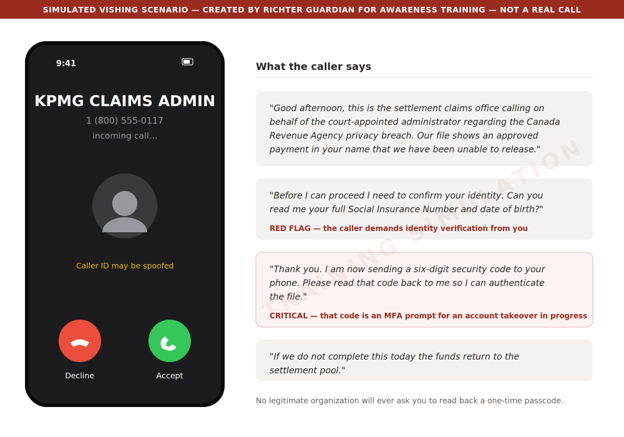
Example 4: Voice call and voicemail pre-text

What to watch for

  • An inbound unsolicited call
  • Identity verification demanded by the caller rather than by you
  • Above all, a request to read back a code sent to your phone. That code is a multi factor authentication (MFA) prompt for an account the caller is trying to take over at that moment. No legitimate organization will ever ask for it

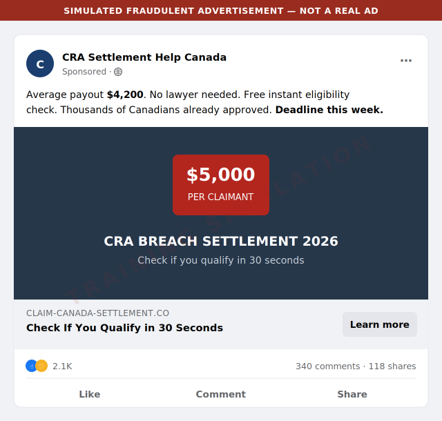
Example 5: Social media and search advertising

What to watch for

  • An invented average payout
  • A fabricated deadline
  • A paid placement above the genuine result

Reach the administrator by typing the address directly - https://www.breachsettlementcanada.kpmg.ca - rather than by clicking any advertisement or search result.

Red flags to brief your household and staff on

Unsolicited contact

The administrator contacts class members by mail or from its own domain. It will not cold call, text, or direct message you.

A guaranteed amount up front

Real compensation is up to $80 or up to $200 for time spent, plus up to $5,000 in documented out of pocket costs, and amounts may be reduced depending on how many claims are approved. Nobody can promise you $5,000.

Artificial urgency

The real deadline is February 3, 2027. Any message giving you 24 hours, 48 hours, or "this week" is manufacturing pressure.

Over collection of identity data

The genuine eligibility check asks for a last name, the last three digits of your SIN, and an email address. A request for the full SIN, date of birth, ID scans, or CRA credentials is a data harvest.

Any request for a fee

Filing a claim is free. A processing, verification, or expedite fee means fraud.

Any request for a code

A one time passcode read aloud, forwarded, or typed into a third party site hands over your account.

Look-alike domains

Check the address carefully. The genuine site is https://www.breachsettlementcanada.kpmg.ca.

Anything ending in .info, .net, .co, .ca-claims, or a hyphenated variant of the KPMG name is not it.

Payment by unusual method

Requests to move funds, buy gift cards, or receive a payout through e-transfer to a new recipient are not part of any settlement.

What we recommend you do

For principals and family members

Type the address, never click

Reach the eligibility check only by typing https://www.breachsettlementcanada.kpmg.ca into the web browser. Do not use links from email, text, social media, or search advertisements.

Verify by calling back

If someone claims to be the administrator, hang up and contact breachsettlementcanada@kpmg.ca from the details on the official site.

Treat the SIN as a credential

Never provide a full Social Insurance Number to an inbound contact.

Check your CRA account directly

Sign in to CRA My Account by typing the address, confirm your direct deposit details and mailing address have not been changed, and enable multi factor authentication if it is not already on.

Consider a credit file alert

If you believe your information was exposed, place a fraud alert with Equifax Canada and TransUnion Canada.

For family offices and business staff

Brief your team this week

Forward or print this email to anyone who handles correspondence, banking, or tax filings on a principal's behalf.

Add a verification step

Any instruction arising from a settlement, refund, or government notice must be verified by an out of band call to a known number before any data or funds move.

Watch for lookalike domains

Ask your IT provider to monitor for newly registered domains that combine your family or firm name with settlement, claim, refund, or CRA terms.

Tune your email filtering

Quarantine newly registered sender domains and flag external mail referencing CRA settlements or class action payouts.

Report and preserve

Report suspected scams to the Canadian Anti-Fraud Centre at 1-888-495-8501 and preserve the original message headers rather than deleting them.

If you think you've already been caught

Move quickly

Change the password on any account whose credentials were entered, starting with CRA My Account and your email, and revoke active sessions.

Call the CRA

If CRA credentials were disclosed, contact the CRA immediately and ask that the account be locked and reviewed for changes to direct deposit or address.

Notify your bank

Report the exposure and ask for enhanced verification on outbound payments.

File a credit alert

Contact Equifax Canada and TransUnion Canada.

Contact Richter Guardian

Speak to your Richter Guardian team. We can help contain the incident, assess what was exposed, and coordinate monitoring.

Ready to stay protected from digital threats, with experienced professionals overseeing your security?

Request a private consultation to find out whether Richter Guardian is a good fit for you.

Digital protection tips
Subscribe to newsletter

Subscribe to receive our latest news and insights in your inbox each week.

By subscribing you agree to with our Privacy Policy.
Thank you! Your submission has been received!
Oops! Something went wrong while submitting the form.

Protect your digital life by detecting risks before they escalate

Richter Guardian gives you enterprise-level cybersecurity tailored for individuals, families, and executives.

24/7 monitoring & threat intelligence
Identity theft & impersonation detection
Fast incident recovery & expert guidance
Have questions after reading?
Blog

Related posts

Woman shopping at a high-end shop

What the IDScan.net breach means for high-net-worth individuals, executives and their family members who have a Canadian driver's licence

Over 153 million driver's licences, including those from over 1 million Canadian were recently exposed on the dark web. Canada's privacy commissioner is now investigating IDScan.net as part of this breach. For high-net-worth individuals, executives and their families, the risk goes beyond fraud, since a leaked identity card can enable impersonation and targeted scams with heightened consequences.

On September 1, 2026, cybersecurity journalist Brian Krebs found a listing on the dark web called Nexus selling scans of more than 153 million driver's licences from Canada and the U.S.A. The images appeared to come from an identity verification company most people have never heard of: IDScan.net.

Have you ever handed your driver's licence to a retail store cashier, nightclub manager, hotel front desk clerk or car rental agent? If yes, this breach may impact you.

If matters even more if you run a company, sit on an advisory board or manage family wealth.

Here is what we know, why it hits harder at the high-net-worth level, and what a smart response looks like.

What we know so far

The information that follows comes from Krebs on Security, Global News, Yahoo Finance Canada and IDScan.net itself.

These identity files claimed 153 million driver's licences, 10 million ID cards, 3 million travel documents and 579,000 medical cards. About 1.1 million records were Canadian, and Ontario had the most, at 473,673.

Krebs said a record could include front and back images, plus infrared and ultraviolet scans. He checked nine people's records. Each had travelled on or near the date stamp, including at a car rental counter and a cannabis dispensary.

IDScan.net sells ID scanning software to businesses such as bars, casinos, car rental firms and cannabis shops. The company's September 4th notice said an unauthorized party may have accessed or copied customer data, including names and ID numbers. IDScan.net said full access required payment, and it offered free credit monitoring.

Officials then stepped in:

- The FBI said on September 2 that it was looking into the incident. The RCMP also said it was monitoring the situation.

- On September 21, Privacy Commissioner Philippe Dufresne opened a formal investigation. The investigation will examine IDScan.net's security safeguards and whether it properly told affected people, under PIPEDA, Canada's federal private-sector privacy law. CBC and The Spec also covered the announcement.

One caution: the big numbers come from the seller and from Krebs. Global News reported that neither the RCMP nor the Canadian Centre for Cyber Security has confirmed them.

IDScan.net has not said how many Canadians are affected. Krebs reported that Nexus went offline soon after his story ran. A site going dark does not mean copied data disappears.

Why your Canadian driver's licence is more than just an identity card

A driver's licence holds your full name, home address, birth date and ID number, plus your photo. Yahoo Finance reports that modern scanners capture both sides of the card and often send the image to cloud servers.

Criminals can use those details to open credit in your name. They can also write scams that sound real, because they know things about you.

Experts told Global News that phishing emails and texts are the likely next step. They also said that once data is out, there is little you can do to pull it back. And you can't reset your face like a password.

Researchers have warned that AI photo-matching tools make stolen photo scans a real concern.

Why this breach in particular matters for high-net-worth individuals, executives and their family members

You have increased visibility

Security researcher Zach Edwards said, "There's never been a breach of driver's licences at this scale." He added that the ongoing nature of the breach created national security risks for high-profile people.

Krebs found licences of senior U.S. officials for sale. Cybernews reported that analysts see celebrities, politicians, lawyers and wealthy people as especially exposed.

For a prominent family, a name, address and face are a strong starting kit for a targeted scam, or something worse. A driver's licence scan is also easy to pair with public facts about you, like your company, your donations and your advisory board seats.

You have heightened responsibility

If you lead a business, a family office or an estate, your identity is a key that opens other people's money. A criminal posing as you can call a bank, email an advisor or pressure an assistant. The damage can be financial, and it can hurt your reputation too.

You deal with added complexity

Wealth means more properties, vehicles, trips, accounts and people acting on your behalf. Your adult children get scanned at clubs. An assistant rents a car. A house manager registers a guest. Each one is another vendor holding another copy.

There is a bright side: Wealth buys excellent lawyers, accountants and security advisors. The problem is that each sees only their own slice. No one often sees the whole picture.

You can't audit every vendor

The privacy commissioner's investigation matters. Under PIPEDA, businesses must protect the data they collect. Unfortunately investigations come after the breach, and your driver's licence was sitting with a company you never chose, after a scan you didn't think twice about.

A modern approach: Assume you are exposed, but limit the damage

Good security today does not depend on keeping every secret. It assumes some of your data is already out there, then makes it hard to use. Five habits help:

1. Ask for a visual check

Yahoo Finance notes you can usually ask staff to look at your card instead of scanning it. You can also ask where scans are stored.

2. Watch your credit

Pull your reports from TransUnion or Equifax, and consider a fraud alert. The RCMP also urges people to monitor financial and government accounts and to report fraud to police and the Canadian Anti-Fraud Centre.

TransUnion is included with your Richter Guardian subscription.

3. Lock down your accounts, including email addresses and social media

Use strong, unique passwords and multi-factor-authentication (MFA) everywhere, as the Canadian Centre for Cyber Security advises. Start with your email addresses and social media accounts, for everyone in your family.

4. Set a family "verify first" rule

Any urgent request for money, access or documents has to be confirmed through a second channel, like a call to a known number. This should cover assistants, advisors and adult children.

5. Get a single, comprehensive and ongoing view of your digital risk level

Someone should watch the whole household, not each account on its own.

You can start making these first four changes today.

The fifth is difficult and time-consuming to do alone, and where Richter Guardian delivers as a modern personal cybersecurity program for high-net-worth individuals, executives and their families.

Where Richter Guardian fits

Richter Guardian can't pull a licence out of a dark web vendor's database. No one can. What we can do is watch the doors criminals try next.

After a government ID leaks, attackers still need to act like you. That often means taking over an email account or social account, or building a fake profile.

Richter Guardian's reputation and identity protection is built for that moment. It works in four steps:

Understand

We begin by understanding your personal digital environment, including the devices and accounts you rely on, your social media presence, and where exposure is most likely to exist.

Monitor

24 hours a day, 7 days a week, our monitoring and prevention runs quietly in the background. Richter Guardian helps identify meaningful risk signals tied to your personal digital life.

Surface

When something matters, our team of cybersecurity experts will review it. We share with you the context and priority, so you know why it's important. This can be done via the Richter Guardian mobile app, telephone, email, online video or in-person.

Guide

If action is needed, Richter Guardian's human-led team, known as the Cyber Defence Desk help you decide next steps, discreetly.

Instead of a flood of alerts, you get what matters: Summary and guidance explained in plain language, and a human to talk to and lead you through the situation.

Our team can also coordinate with your existing advisors or IT service provider, so your family office, lawyer and bank aren't left guessing. Richter Guardian fits into a busy life instead of interrupting it.

Take the next step: Request a private consultation or complete a brief assessment

A breach like this is a good opportunity to look at you and your family's digital risk level, before someone else does.

Request a private consultation. Discuss the identities and accounts you want protected, and ask us any questions. It's confidential and no-obligation.

Not yet ready to talk? Try our What's my risk? assessment. It takes a few minutes, needs no sensitive details, and your summary arrives by email.

Article illustration: Synthetic and traditional identity theft scams

Navigating the terrain of synthetic and traditional theft scams

Synthetic and traditional identity theft both put your finances and reputation at risk. We share practical steps: credit monitoring, securing mail and documents, password vaults, and limiting what you carry.

Introduction​

In an increasingly interconnected digital world, safeguarding personal and financial information has never been more crucial. Cybercriminals can exploit stolen identity information to commit financial fraud, gain unauthorized access to accounts, and engage in other criminal activities. In the context of identity theft – there is both synthetic identity theft and traditional identity theft. ​

Synthetic identity theft combines personally identifiable information (PII) to manufacture a person or entity for the use of illegal, nefarious activity. ​

Traditional identity theft involves stealing an individual’s existing personal data to impersonate them. ​

Alternatively, synthetic identity theft involves criminals obtaining small fragments of a real person’s identity to fabricate a completely new identity. The real elements of the fabricated individual adds a sense of legitimacy to the identity. ​

Preventing identity theft of all kinds​

​Protecting yourself from identity theft, fraud, and unauthorized access to your sensitive data is our responsibility. Below, we have compiled a comprehensive list of security measures and best practices to help you fortify your defenses against potential threats. ​

By following these guidelines, you can take proactive steps to enhance your security and financial well-being. From monitoring your credit report to secure document disposal, each suggestion in this list is designed to empower you with the knowledge and tools to protect your valuable information and minimize the risks associated with identity theft and fraud.​

  1. Monitor Your Credit Report: Regularly monitor your credit report to detect any unauthorized activity. If you come across information unrelated to you, contact the creditor and inquire about the account or inquiry.
  2. Limit What You Carry: Avoid carrying additional credit cards, birth certificates, SIN cards, or passports in your wallet or purse unless absolutely necessary. This precaution reduces the amount of information a potential thief could access if your wallet or purse gets lost.
  3. Secure Your Mailbox: Consider installing a mailbox with a lock at your residence to minimize the risk of mail theft.
  4. Securely Dispose: Never dispose of credit card receipts or personal information documents in a public trash container; use a shredder instead.
  5. Secure Your Purse or Wallet: Never leave your purse or wallet unattended, whether at work or in places like churches, restaurants, fitness clubs, parties, or shopping carts. Also, avoid leaving your purse or wallet visible in your car, even if the vehicle is locked.
  6. Limit Your Credit: Limit the number of credit cards you possess and cancel inactive accounts to simplify your financial security.
  7. Be Careful of What you Disclose: Do not disclose your credit card, bank, or Social Insurance information over the phone, even if you initiated the call, unless you can confidently verify the call’s legitimacy
  8. Secure Receipts: Securely store and shred credit, debit, and ATM card receipts before disposing of them.
  9. Scrutinize Your Bills: Scrutinize your utility and subscription bills regularly to confirm the accuracy of the charges.
  10. Do Not Write Down Your Passwords (except in a Password Vault): Memorize your passwords and personal identification numbers (PINs) to eliminate the need to write them down or use a password vault. Remain vigilant when entering your PIN to ensure no one is observing you.
  11. Secure Your Information: Maintain a comprehensive list of all your credit and bank accounts in a secure location, such as a password vault. This will facilitate quick communication with issuers if your cards go missing, including providing account numbers, expiration dates, and customer service and fraud department contact numbers.
  12. Shred Pre-approved Credit Offers: Before discarding pre-approved credit offers, credit card receipts, or phone bills, tear them into small pieces or cross-cut shred them to prevent potential identity theft. Thieves can use such offers to apply for credit cards in your name and redirect them to their address.
  13. Keep Your Credit Information Accurate: According to consumer reporting legislation, if you believe any entry on your credit report is incorrect or incomplete, you can notify a major credit reporting bureau, which will verify the information at no charge. Remember that they typically do not accept disputes from third parties unless accompanied by a notarized power of attorney authorizing a licensed attorney or a family member to represent you or if the power of attorney is unlimited and irrevocable.

Ready to stay protected from digital threats, with experienced professionals overseeing your security?

Request a private consultation to find out whether Richter Guardian is a good fit for you.

Article illustration: SMS Phishing Scams Targeting Road Toll Payments

SMS Phishing Scams Targeting Road Toll Payments

SMS phishing scams impersonating 407 ETR are targeting Canadians with fake toll payment links. Learn how 407 ETR really contacts customers and how to verify messages with Richter Guardian.

Introduction​

​A wave of SMS phishing attacks targeting Canadians with lures regarding unpaid road toll fees have been rolling out since the beginning of the year. 407 ETR has been warning customers to beware of fraudulent texts impersonating the company. The message is designed to deceive people into clicking on a malicious link, which would leave people vulnerable to personal data theft. ​

How to spot a real message

407 ETR will use specific communication methods to interact with customers that use the express toll route. If you are a customer that uses the 407, take note of these legitimate communication channels:​

  • 407 ETR sends payment reminder text messages from a six-digit short code. Messages don’t contain any personal or account information and include a link to their secure payment web page. Their texts will never include a direct link to pay.​
  • 407 ETR makes outbound automated payment reminder calls. These calls will not ask you for your personal information. ​
  • 407 ETR will only send emails from info@407etr.com or communications@407etr.com. Ensure that the emails you receive do not have spelling errors. ​

Ready to stay protected from digital threats, with experienced professionals overseeing your security?

Request a private consultation to find out whether Richter Guardian is a good fit for you.