A wave of SMS phishing attacks targeting Canadians with lures regarding unpaid road toll fees have been rolling out since the beginning of the year. 407 ETR has been warning customers to beware of fraudulent texts impersonating the company. The message is designed to deceive people into clicking on a malicious link, which would leave people vulnerable to personal data theft.
How to spot a real message
407 ETR will use specific communication methods to interact with customers that use the express toll route. If you are a customer that uses the 407, take note of these legitimate communication channels:
407 ETR sends payment reminder text messages from a six-digit short code. Messages don’t contain any personal or account information and include a link to their secure payment web page. Their texts will never include a direct link to pay.
407 ETR makes outbound automated payment reminder calls. These calls will not ask you for your personal information.
QR code scams are on the rise—fake parking meters, phishing, and fake utility notices. We outline common tactics and how to verify before scanning, check URLs, and spot tampering, with Richter Guardian’s scanning tools.
Read more
Introduction
A quick-response code (QR) is a type of barcode designed to store information in a way that digital devices can quickly read. Most modern smartphones come equipped with QR scanners, often integrated into the camera application, making scanning QR codes a breeze. The barcode is extremely versatile – it can be used as a shortcut to download applications, connect to wi-fi networks, open website links, and facilitate financial transactions. While QR codes serve many useful purposes, scammers have also found ways to exploit them.
According to reports from the Better Business Bureau (BBB) and police departments across the country, scammers are using QR codes to trick people into visiting fake websites, fraudulent payment portals, or downloading harmful software. Often, these scams come through unsolicited messages or from QR codes posted in public places.
How can I get scammed with QR codes?
Hackers can manipulate QR codes to conduct malicious activities. Here are a few examples:
Parking Meter Payments: Scammers have been placing fake QR codes on parking meters, making people think they can pay for parking through the code. These fake codes are easy to create and print. After using them, some victims return to find they’ve been fined or towed, increasing their financial losses.
Phishing Scams: Scammers use QR codes to lead people to phishing websites that ask for personal information, which can lead to identity theft. These codes can come via email, text, or on public flyers, often disguised as legitimate requests to verify your identity or account.
Fake Utility and Government Notices: Scammers often pose as utility companies or other government agencies, claiming there’s an unpaid bill that needs immediate attention. They ask for payment through a QR code, which takes victims to a convincing fake website. Business owners have also reported receiving letters with QR codes, asking them to complete fake filing requirements.
False Sense of Security: Scammers sometimes use real QR codes to make their schemes more convincing. For example, they might link to a legitimate website or fake employee profiles, using official logos and details to trick victims into trusting them.
Recommendations
By staying alert and verifying sources, you can protect yourself from falling victim to QR code scams. We recommend the following tips to avoid QR code scams:
Verify Before Scanning: If you receive a QR code from a friend or colleague, confirm with them that they actually meant to send it. Be cautious if the message feels out of character.
Be Cautious of Shortened URLs: When you hover your camera over a QR code, check the link that appears. If it’s a shortened URL, you won’t know where it leads, so proceed only if you’re confident the source is trustworthy.
Look for Tampering: Scammers might alter legitimate QR codes by placing stickers over them. Keep an eye out for signs of tampering, and ask the business to verify the code if you notice anything suspicious.
Ready to stay protected from digital threats, with experienced professionals overseeing your security?
A legitimate $8.7 million settlement claims process opened August 4, 2026, for victims of a 2020 Government of Canada data breach—but its publicity gives fraudsters cover to build fake portals, send phishing schemes, create impersonations and harvest personal credentials. Expect fake eligibility checks, fake claims portals and claims administrator scams involving KPMG, CRA, and class counsel through the February 2027 deadline.
This covered people whose personal or financial information in a Government of Canada online account, including the Canada Revenue Agency portal, was accessed without authorization in 2020.
KPMG is the court appointed administrator, and eligible class members can submit claims online or by mail until February 3, 2027.
The settlement is legitimate, but the publicity around it is exactly the conditions fraudsters look for:
A national news story
A real government linked payout
A real deadline
A real administrator asking people to enter a last name and the last three digits of a Social Insurance Number on a website
That combination gives criminals a credible pretext to build convincing fake eligibility checkers and claim portals, and to harvest identity data and account credentials at scale.
Our expectation
A wave of phishing email, SMS, social media advertising, sponsored search results, and voice calls impersonating KPMG, the CRA, the Federal Court, and class counsel, beginning within days of the news coverage and continuing through the February 2027 claim deadline.
The only legitimate channels and what to watch for
A copy of a government ID uploaded to a chat window
Any payment or fee. There is no fee to file a claim
Anything arriving by unsolicited text, direct message, or phone call that pushes you toward a different address, a shortened link, or an app download should be treated as fraudulent until proven otherwise.
What the fakes will look like
The following mock ups were produced by Richter Guardian for training purposes.
These are not real messages and the addresses and links shown are illustrative only.
Share them with your household, your office staff, and anyone who manages correspondence on your behalf.
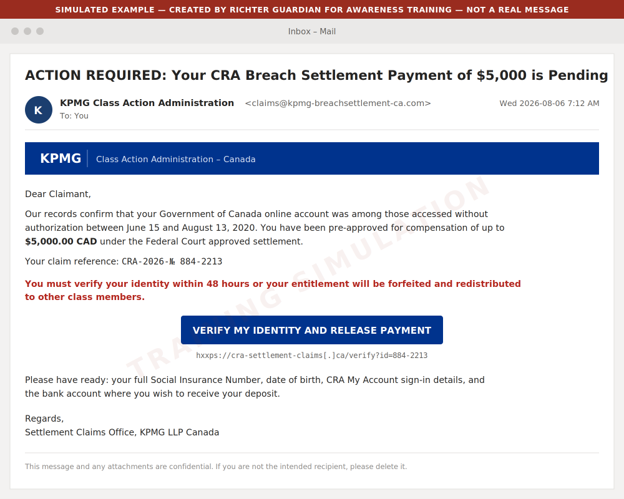
Example 1: Phishing email impersonating the claims administrator
A pre-approved dollar figure the real administrator would never quote up front
A 48 hour forfeiture threat against a deadline that is actually February 3, 2027
A request for the full SIN
CRA sign-in details
Banking information
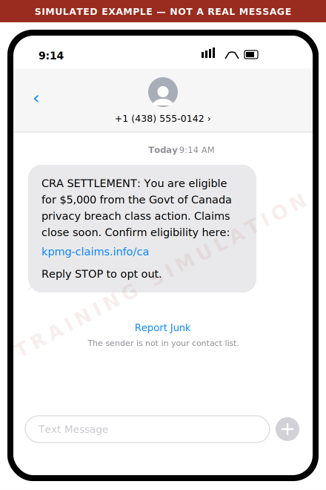
Example 2: Smishing text message
What to watch for
The administrator does not solicit claims by text message
The domain is not kpmg.ca
The amount is presented as guaranteed
Urgency is manufactured
Legitimate class action notice arrives by mail or from the administrator's own address.
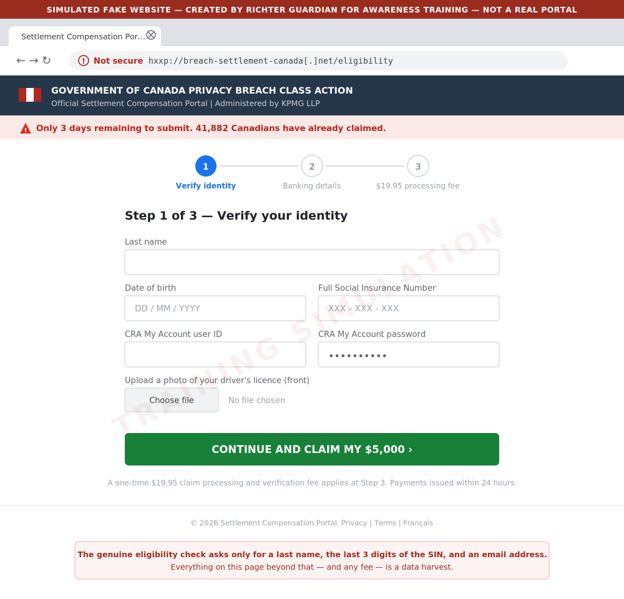
Example 3: Fake eligibility and claim portal
What to watch for
An unencrypted look-alike domain
A full SIN and CRA credentials requested where the real site asks only for a last name
Three SIN digits
An email address
An ID upload
A processing fee where the real claim is free
False scarcity counters
Criminals also buy sponsored search advertisements so these pages appear above the real one.
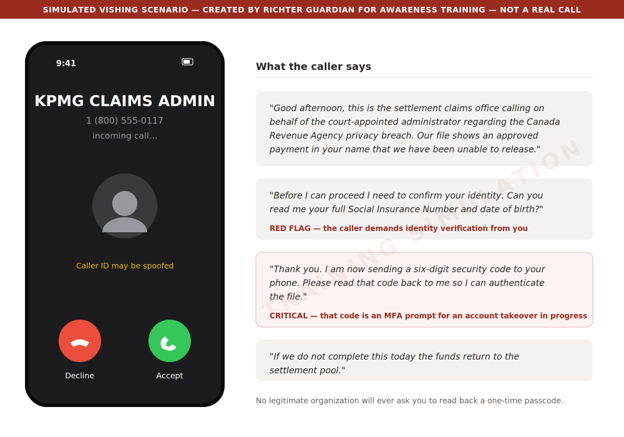
Example 4: Voice call and voicemail pre-text
What to watch for
An inbound unsolicited call
Identity verification demanded by the caller rather than by you
Above all, a request to read back a code sent to your phone. That code is a multi factor authentication (MFA) prompt for an account the caller is trying to take over at that moment. No legitimate organization will ever ask for it
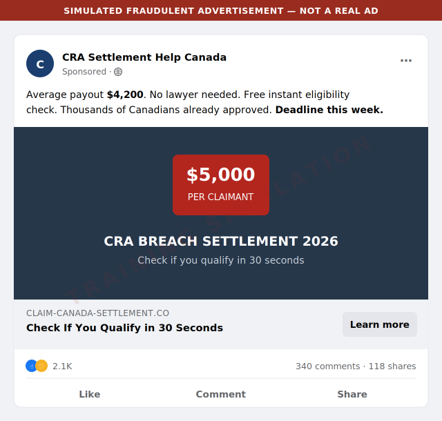
Example 5: Social media and search advertising
What to watch for
An invented average payout
A fabricated deadline
A paid placement above the genuine result
Reach the administrator by typing the address directly - https://www.breachsettlementcanada.kpmg.ca - rather than by clicking any advertisement or search result.
Red flags to brief your household and staff on
Unsolicited contact
The administrator contacts class members by mail or from its own domain. It will not cold call, text, or direct message you.
A guaranteed amount up front
Real compensation is up to $80 or up to $200 for time spent, plus up to $5,000 in documented out of pocket costs, and amounts may be reduced depending on how many claims are approved. Nobody can promise you $5,000.
Artificial urgency
The real deadline is February 3, 2027. Any message giving you 24 hours, 48 hours, or "this week" is manufacturing pressure.
Over collection of identity data
The genuine eligibility check asks for a last name, the last three digits of your SIN, and an email address. A request for the full SIN, date of birth, ID scans, or CRA credentials is a data harvest.
Any request for a fee
Filing a claim is free. A processing, verification, or expedite fee means fraud.
Any request for a code
A one time passcode read aloud, forwarded, or typed into a third party site hands over your account.
Anything ending in .info, .net, .co, .ca-claims, or a hyphenated variant of the KPMG name is not it.
Payment by unusual method
Requests to move funds, buy gift cards, or receive a payout through e-transfer to a new recipient are not part of any settlement.
What we recommend you do
For principals and family members
Type the address, never click
Reach the eligibility check only by typing https://www.breachsettlementcanada.kpmg.ca into the web browser. Do not use links from email, text, social media, or search advertisements.
Verify by calling back
If someone claims to be the administrator, hang up and contact breachsettlementcanada@kpmg.ca from the details on the official site.
Treat the SIN as a credential
Never provide a full Social Insurance Number to an inbound contact.
Check your CRA account directly
Sign in to CRA My Account by typing the address, confirm your direct deposit details and mailing address have not been changed, and enable multi factor authentication if it is not already on.
Consider a credit file alert
If you believe your information was exposed, place a fraud alert with Equifax Canada and TransUnion Canada.
For family offices and business staff
Brief your team this week
Forward or print this email to anyone who handles correspondence, banking, or tax filings on a principal's behalf.
Add a verification step
Any instruction arising from a settlement, refund, or government notice must be verified by an out of band call to a known number before any data or funds move.
Watch for lookalike domains
Ask your IT provider to monitor for newly registered domains that combine your family or firm name with settlement, claim, refund, or CRA terms.
Tune your email filtering
Quarantine newly registered sender domains and flag external mail referencing CRA settlements or class action payouts.
Report and preserve
Report suspected scams to the Canadian Anti-Fraud Centre at 1-888-495-8501 and preserve the original message headers rather than deleting them.
If you think you've already been caught
Move quickly
Change the password on any account whose credentials were entered, starting with CRA My Account and your email, and revoke active sessions.
Call the CRA
If CRA credentials were disclosed, contact the CRA immediately and ask that the account be locked and reviewed for changes to direct deposit or address.
Notify your bank
Report the exposure and ask for enhanced verification on outbound payments.
File a credit alert
Contact Equifax Canada and TransUnion Canada.
Contact Richter Guardian
Speak to your Richter Guardian team. We can help contain the incident, assess what was exposed, and coordinate monitoring.
Ready to stay protected from digital threats, with experienced professionals overseeing your security?
Why Authenticator Apps Are Safer Than SMS for Login Security
Authenticator apps are more secure than SMS for two-factor authentication. We compare both methods, explain SIM swapping and interception risks, and recommend using an authenticator app for important accounts.
Read more
Introduction
One of the best ways to add extra security to your accounts is through Multi-Factor Authentication (MFA) – this means you need more than just a user ID and password to log in. We strongly recommend using MFA for your important accounts.
However, not all MFA methods are equally secure. Authenticator apps are a safer option than SMS authentication methods because they generate security codes directly on your device. SMS authentication codes, on the other hand, can be intercepted by hackers.
What is Multi-Factor Authentication and what is the benefit?
MFA adds an extra step to logging in. Instead of just entering a user ID and password, you must also provide another piece of information, like a code from an app or a text message. This extra step makes it much harder for hackers to break into your account, even if they steal your password.
MFA method #1: What is an authenticator application?
An authenticator app is a mobile app that generates security codes for logging in. These codes are called Time-Based One-Time Passwords (TOTP) and change every 30 to 60 seconds.
When you set up an authenticator app for an account, you scan a QR code or enter a secret key. This links the authenticator app to your account and allows it to generate matching codes.
To log in, you enter your username, password, and the current code displayed on your authenticator app. If the code matches the one your account server expects, you get access.
Some popular authenticator applications include:
Google Authenticator
Microsoft Authenticator
Authy
Duo Mobile
MFA method #2: What is SMS authentication?
SMS authentication is when a security code is sent to your phone via text message. You enter this code along with your user ID and password to log in. These codes are One-Time Passwords (OTP) which are generated for one-time use. OTPs can last for a specified amount of time – users will need to generate a new OTP if they exceed the time limit.
Sometimes, websites may also send security codes via email instead of SMS, but the process is the same.
Why authenticator applications are preferred over SMS authentication
Authenticator apps provide better security than SMS codes for several reasons:
Less chance of being hacked: Authenticator apps generate codes directly on your device, while SMS codes are sent over the internet and can be stolen.
No risk of SIM swapping: Hackers can trick your phone provider into transferring your number to a new SIM card, allowing them to receive your SMS codes.
No risk of interception: SMS codes can be stolen using man-in-the-middle attacks, where hackers eavesdrop on internet traffic.
Codes change frequently: Authenticator apps refresh their codes every 30 to 60 seconds, making them harder to steal and use.
How hackers can steal SMS codes
Here are two common ways cybercriminals can steal SMS codes:
Man-in-the-Middle Attacks – Hackers intercept your internet traffic when you connect to an unprotected Wi-Fi network (like public Wi-Fi at a coffee shop). This can let them steal SMS codes.
SIM Swapping – A hacker contacts your mobile provider pretending to be you and tricks them into activating a new SIM card with your phone number. Now, they receive all your text messages, including your security codes.
How to keep your accounts safe
Use an authenticator app instead of SMS authentication whenever possible.
Protect your phone with a strong PIN or password.
Avoid using public Wi-Fi when entering security codes.
Never share your security codes with anyone.
Be cautious of phishing scams that try to trick you into revealing your codes.
Ready to stay protected from digital threats, with experienced professionals overseeing your security?
.png)


%20(1).png)