Insights on digital risk and
personal security
Digital risk is evolving quickly. For individuals and families with greater public presence, professional responsibility, or complex personal lives, digital exposure is often higher. The impact of a security incident can extend beyond inconvenience to affect privacy, reputation, and financial well-being.
%20(1).avif)
%20(1).png)
Featured articles
A small selection of articles that help readers stay informed about personal and executive digital risk.

On August 4, 2026, the claims process opened for a $8.7 million settlement of a class action against the Government of Canada.
This covered people whose personal or financial information in a Government of Canada online account, including the Canada Revenue Agency portal, was accessed without authorization in 2020.
KPMG is the court appointed administrator, and eligible class members can submit claims online or by mail until February 3, 2027.
The settlement is legitimate, but the publicity around it is exactly the conditions fraudsters look for:
- A national news story
- A real government linked payout
- A real deadline
- A real administrator asking people to enter a last name and the last three digits of a Social Insurance Number on a website
That combination gives criminals a credible pretext to build convincing fake eligibility checkers and claim portals, and to harvest identity data and account credentials at scale.
Our expectation
A wave of phishing email, SMS, social media advertising, sponsored search results, and voice calls impersonating KPMG, the CRA, the Federal Court, and class counsel, beginning within days of the news coverage and continuing through the February 2027 claim deadline.
The only legitimate channels and what to watch for
Official settlement website
https://www.breachsettlementcanada.kpmg.ca (English and French). This is the court appointed administrator's website.
Official email address
breachsettlementcanada@kpmg.ca
What the real eligibility check asks for
- Last name
- Last three digits of the SIN
- An email address
- Nothing more at the eligibility stage
What the real process NEVER asks for
- Full SIN
- Date of birth
- Banking credentials
- CRA My Account user ID or password
- A multi factor authentication code
- A credit card number
- A copy of a government ID uploaded to a chat window
- Any payment or fee. There is no fee to file a claim
Anything arriving by unsolicited text, direct message, or phone call that pushes you toward a different address, a shortened link, or an app download should be treated as fraudulent until proven otherwise.
What the fakes will look like
The following mock ups were produced by Richter Guardian for training purposes.
These are not real messages and the addresses and links shown are illustrative only.
Share them with your household, your office staff, and anyone who manages correspondence on your behalf.
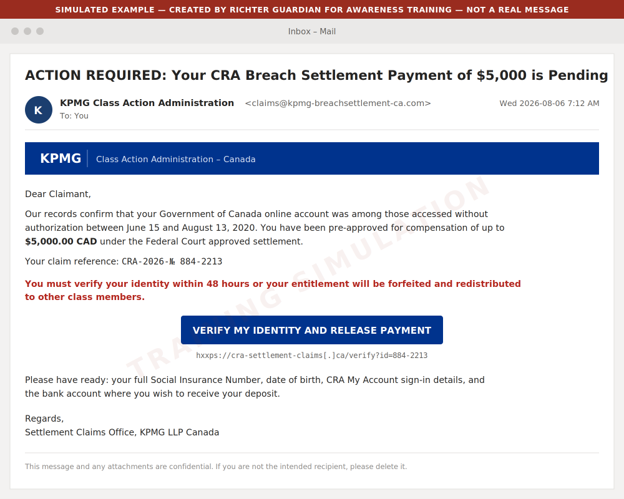
Example 1: Phishing email impersonating the claims administrator

What to watch for
- Look-alike sender domain rather than https://www.breachsettlementcanada.kpmg.ca
- A pre-approved dollar figure the real administrator would never quote up front
- A 48 hour forfeiture threat against a deadline that is actually February 3, 2027
- A request for the full SIN
- CRA sign-in details
- Banking information
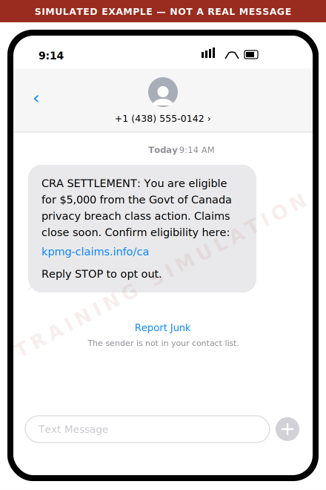
Example 2: Smishing text message

What to watch for
- The administrator does not solicit claims by text message
- The domain is not kpmg.ca
- The amount is presented as guaranteed
- Urgency is manufactured
Legitimate class action notice arrives by mail or from the administrator's own address.
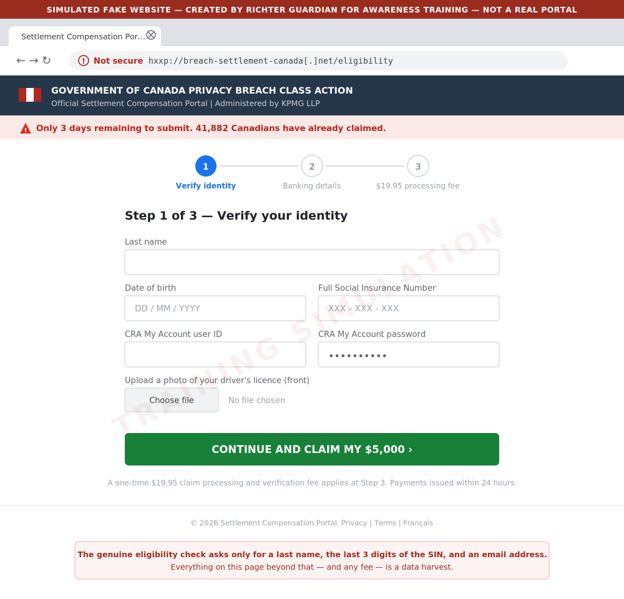
Example 3: Fake eligibility and claim portal

What to watch for
- An unencrypted look-alike domain
- A full SIN and CRA credentials requested where the real site asks only for a last name
- Three SIN digits
- An email address
- An ID upload
- A processing fee where the real claim is free
- False scarcity counters
Criminals also buy sponsored search advertisements so these pages appear above the real one.
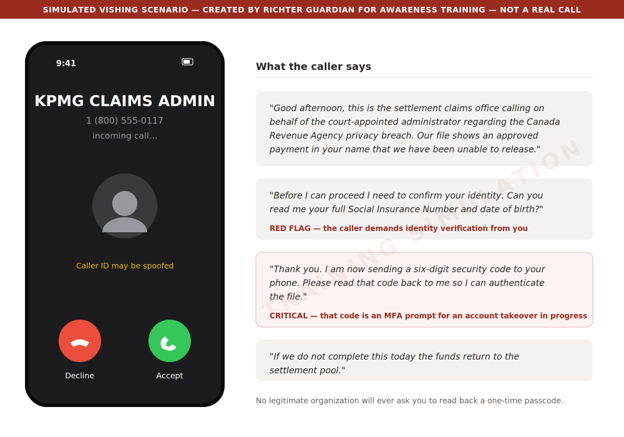
Example 4: Voice call and voicemail pre-text

What to watch for
- An inbound unsolicited call
- Identity verification demanded by the caller rather than by you
- Above all, a request to read back a code sent to your phone. That code is a multi factor authentication (MFA) prompt for an account the caller is trying to take over at that moment. No legitimate organization will ever ask for it
Example 5: Social media and search advertising

What to watch for
- An invented average payout
- A fabricated deadline
- A paid placement above the genuine result
Reach the administrator by typing the address directly - https://www.breachsettlementcanada.kpmg.ca - rather than by clicking any advertisement or search result.
Red flags to brief your household and staff on
Unsolicited contact
The administrator contacts class members by mail or from its own domain. It will not cold call, text, or direct message you.
A guaranteed amount up front
Real compensation is up to $80 or up to $200 for time spent, plus up to $5,000 in documented out of pocket costs, and amounts may be reduced depending on how many claims are approved. Nobody can promise you $5,000.
Artificial urgency
The real deadline is February 3, 2027. Any message giving you 24 hours, 48 hours, or "this week" is manufacturing pressure.
Over collection of identity data
The genuine eligibility check asks for a last name, the last three digits of your SIN, and an email address. A request for the full SIN, date of birth, ID scans, or CRA credentials is a data harvest.
Any request for a fee
Filing a claim is free. A processing, verification, or expedite fee means fraud.
Any request for a code
A one time passcode read aloud, forwarded, or typed into a third party site hands over your account.
Look-alike domains
Check the address carefully. The genuine site is https://www.breachsettlementcanada.kpmg.ca.
Anything ending in .info, .net, .co, .ca-claims, or a hyphenated variant of the KPMG name is not it.
Payment by unusual method
Requests to move funds, buy gift cards, or receive a payout through e-transfer to a new recipient are not part of any settlement.
What we recommend you do
For principals and family members
Type the address, never click
Reach the eligibility check only by typing https://www.breachsettlementcanada.kpmg.ca into the web browser. Do not use links from email, text, social media, or search advertisements.
Verify by calling back
If someone claims to be the administrator, hang up and contact breachsettlementcanada@kpmg.ca from the details on the official site.
Treat the SIN as a credential
Never provide a full Social Insurance Number to an inbound contact.
Check your CRA account directly
Sign in to CRA My Account by typing the address, confirm your direct deposit details and mailing address have not been changed, and enable multi factor authentication if it is not already on.
Consider a credit file alert
If you believe your information was exposed, place a fraud alert with Equifax Canada and TransUnion Canada.
For family offices and business staff
Brief your team this week
Forward or print this email to anyone who handles correspondence, banking, or tax filings on a principal's behalf.
Add a verification step
Any instruction arising from a settlement, refund, or government notice must be verified by an out of band call to a known number before any data or funds move.
Watch for lookalike domains
Ask your IT provider to monitor for newly registered domains that combine your family or firm name with settlement, claim, refund, or CRA terms.
Tune your email filtering
Quarantine newly registered sender domains and flag external mail referencing CRA settlements or class action payouts.
Report and preserve
Report suspected scams to the Canadian Anti-Fraud Centre at 1-888-495-8501 and preserve the original message headers rather than deleting them.
If you think you've already been caught
Move quickly
Change the password on any account whose credentials were entered, starting with CRA My Account and your email, and revoke active sessions.
Call the CRA
If CRA credentials were disclosed, contact the CRA immediately and ask that the account be locked and reviewed for changes to direct deposit or address.
Notify your bank
Report the exposure and ask for enhanced verification on outbound payments.
File a credit alert
Contact Equifax Canada and TransUnion Canada.
Contact Richter Guardian
Speak to your Richter Guardian team. We can help contain the incident, assess what was exposed, and coordinate monitoring.
Ready to stay protected from digital threats, with experienced professionals overseeing your security?
Request a private consultation to find out whether Richter Guardian is a good fit for you.

Why Richter Guardian's Digital Executive Protection Works Like a Home Security System
Most families already understand physical home security. A monitored home security system watches the doors, the windows, and the driveway, and it alerts a real person the moment something looks wrong.
Few high-net-worth families would consider their primary residence unprotected in this way.
Yet the equivalent protection is often missing for the digital side of an executive's family life, where far more of their exposure now lives: within personal email accounts, mobile phones, computers, social media profiles, and financial credentials.
Richter Guardian is built around the same underlying idea as a home security system, just applied to a family's digital footprint.
It is worth walking through the comparison directly, because it makes clear what "protection" should include.
Sensors on every door and window, not just the front entrance
A home security system is only as strong as the size of its coverage. A system that only watches the front door leaves every other entry point open. This is why home security systems place sensors on every window, every door, and often the garage too.
Richter Guardian applies this same principle to an executive's digital life on the home and family front. Personal digital protection means every meaningful entry point is covered, not just the obvious one. This includes:
- Personal laptops, tablets and phones, which are frequently the least protected devices in a household.
- Personal and family email accounts, often the single most valuable target since they often double as the recovery method for banking and investment accounts.
- Social media accounts, which can be cloned or impersonated to reach family members, friends, or staff.
Just as an unmonitored side window undermines a home security system's front-door sensor, one unprotected personal device or account can undermine protection everywhere else.
24/7 monitoring, not a sign in the yard
A home security sign discourages some opportunistic activity, but it does not stop a determined intruder, and it certainly does not respond to one.
The value of a real home security system comes from continuous monitoring: sensors that are always active and a monitoring center that is always watching.
The digital equivalent is continuous monitoring for leaked credentials, impersonation, and malware:
- A stolen password sitting on the dark web is like a duplicated house key sitting in a stranger's pocket. It does nothing on its own, but it becomes dangerous the moment someone decides to use it.
- Ongoing dark web and credential monitoring means that exposure is caught before it turns into a break-in, rather than being discovered only after money or data is already gone.
Monitoring that connects you with a real person, not just an app that pings you
When a home alarm is triggered, the value isn't only the alert. It's what happens next.
A monitoring centre verifies the situation and, if needed, contacts emergency services on the homeowner's behalf. Compare that to a security system that simply sends a phone notification and leaves the resident to figure out what to do.
With Richter Guardian, when an issue arises or clarification is required, our concierge support team contacts you in a secure, private and discreet manner. You can also contact us at any time. Either way, communication takes place through the Guardian mobile app, a phone call, or another agreed-upon channel.
Our Guardian professionals, also known as the Cyber Defence Desk, explain what’s happening in clear language and guide next steps in a way that fits into your broader wealth and risk strategies.
This matters most in the moment it's needed: when there's a convincing call, a strange pop-up, or an unexpected wire request.
When you know exactly who to speak with, and have those questions be answered by a real person, is the difference between a contained incident and a costly one.
Motion sensors around the perimeter, not just the locks
Good home security doesn't rely on locks alone. It adds motion sensors, cameras, and perimeter alerts, so that suspicious activity is noticed even if no door has actually been breached yet.
The digital version of this is reputation and identity protection. A cloned social media profile or an impersonation attempt is a form of activity around the perimeter of a family's digital life, well before any account can be compromised.
Monitoring for that activity, and acting on it early, is what keeps a small warning sign from becoming a full-blown incident involving fraud or reputational harm.
Covering every household under one family's roof, not just one address
Here is where the comparison becomes especially important for high-net-worth families with more than one residence, or with members living in different homes altogether.
A homeowner with a vacation property, or an adult child in a separate residence, would not consider that second home "covered" by the security system installed at the primary address. Each home needs its own protection.
The same is true digitally, and it is often overlooked.
A family's digital exposure does not stop at one address. It follows every family member:
- the adult child at university;
- the parent living independently; and
- the staff working across more than one property.
Each of these people and their accounts and devices represents a separate point of exposure, and each needs to be covered on its own, not assumed to be safe because "the family" has security somewhere.
This is why Richter Guardian's approach extends coverage across the full footprint of a family, not just one principal or one property.
Extended visibility across multiple households means that a family member living somewhere else entirely is not left outside the perimeter simply because they aren't under the same roof.
The value of thinking about digital executive protection this way
None of this is meant to suggest that digital executive protection and home security are the same thing, because they aren't.
The underlying logic that makes a home security system worth having is exactly the logic that should apply to a family's digital exposure: full coverage, continuous monitoring, a real response when something goes wrong, and protection that follows every member of the family, not just one address.
Families who wouldn't leave a single window unmonitored at home are, in many cases, leaving several digital windows wide open without realizing it.
Ready to stay protected from digital threats, with experienced professionals overseeing your security?
Request a private consultation to find out whether Richter Guardian is a good fit for you.

Protecting Against Real Estate Wire Fraud
Introduction
Real estate wire fraud is a scam where criminals impersonate trusted parties to redirect money during a property transaction.
These transactions often involve large wire transfers, and time-sensitive communication between buyers, sellers, lawyers, real estate agents, title companies, notaries, and financial institutions.
Together, these factors make real estate transactions a prime target for fraud.
For high-net-worth individuals, and executives, the risks can be especially significant.
Property purchases and sales may involve large sums of money, multiple advisors, and sensitive personal or financial information. A single fraudulent email or payment can lead to substantial financial loss.
The most important rule is simple: before sending money, always verify wire instructions by phone using a trusted number you already have, not one provided in an email.
Why it matters
Real estate transactions remain a major target for fraud. In 2025, the FBI’s Internet Crime Complaint Center reported more than 12,000 real estate fraud complaints and over $275 million in reported losses. This was higher than 2024, when losses were about $173 million.
These losses show how common and damaging real estate fraud can be. In many cases, the victim believes they are sending funds to a legitimate party, only to discover that the money was redirected to a fraudulent account.
How the attack works
Attackers often begin by gaining access to an email account involved in the transaction or by impersonating one of the parties. They may silently monitor the conversation and wait for the right moment to intervene.
Once attackers understand the details of the deal, they send a convincing email with fraudulent bank details that redirect the money to the attacker. Attackers may impersonate any party involved in the transaction, such as a real estate agent, lawyer, title company representative, or even the buyer or seller themselves.
Because the attacker may know specifics like dollar amounts, property addresses, and names of people involved, the message can look legitimate, making the email extremely convincing.
How to protect yourself
The most effective protection is independent verification. Before sending any wire transfer, call the intended recipient using a trusted phone number that was provided in person, saved previously, or found through an independently verified source.
Do not rely on contact information included in an email containing wire instructions. If an attacker controls the email conversation, they may also provide a fake phone number to “confirm” the fraudulent details.
This is especially important as AI voice cloning becomes more convincing. A phone call is only useful if the number is trusted. When in doubt, use a number you already know or independently verify the number through an official website or previously established contact.
The same approach should be used for any high-value payment, account change, or request involving sensitive financial information.
Red flags to watch for
Be cautious of:
- Last-minute changes to wire instructions
- Pressure to wire immediately
- Email addresses that look slightly off, such as ‘titlecompany.co’ instead of ‘titlecompany.com’
- Request to confirm payment details only via email
- Unusual urgency, secrecy, or changes in communication style
- New bank account details that were not previously discussed
However, a well-crafted attack may not include any obvious warning signs. Rather than trying to decide whether an email “looks suspicious”, treat all wire instructions as unverified until they are confirmed by phone using a trusted number.
Before sending a wire transfer
Before sending funds, take these steps:
1. Confirm the wire instructions by phone using a known, trusted number.
2. Verify the recipient's name, bank name, account number, routing number, and payment amount.
3. Do not use phone numbers or links provided in the same email as the wire instructions.
4. Be especially cautious about last-minute changes.
5. If anything feels unusual, pause the transaction and contact your advisor, bank, or security team.
How Richter Guardian can help you
Richter Guardian can help reduce the risk of wire fraud through proactive monitoring, personal cybersecurity guidance, and expert support to secure accounts, devices, credentials, and identity-related information.
If you are unsure about a transaction, receive suspicious payment instructions, or want added protection before a high-value transfer, contact us.
Ready to stay protected from digital threats, with experienced professionals overseeing your security?
Request a private consultation to find out whether Richter Guardian is a good fit for you.

Protecting the People Behind the Family Office, in the Age of AI
A family office exists to protect the family's wealth. Yet, the assets criminals are increasingly targeting with AI aren't corporate accounts or portfolios.
The targets are now personal phones, computers, social media profiles, and email addresses that belong to the people in the family themselves, as well as their trusted managers and executives.
Family office security must also extend there, because every one of those personal touchpoints is a potential doorway into everything else.
One compromised account is rarely the end goal
Criminals rarely stop at a hacked email inbox or a cloned social media profile. They use it as a foothold; a way to keep the cracked door open, ready for further entry.
- A compromised personal email account becomes the launch point for a wire transfer request that looks like it came from a family member.
- A cloned social media account becomes a tool for approaching family members, friends, or staff with a fabricated emergency.
- A malware-infected laptop becomes a quiet way to sit inside a household's financial life for months before anyone notices.
This is what makes personal digital exposure so dangerous for family offices specifically: the assets being protected are already concentrated, and the family members connected to them are the easiest way in. Close one gap and criminals will look for the next unmonitored device, account, or email inbox.
Where increased personal exposure risk lives
Ultra-high-net-worth family office security solutions need to cover the full footprint of a wealthy family, not just the office itself.
Each of these, left unmonitored, becomes a route toward impersonation, extortion, or fraud aimed at the family and, by extension, the office itself.
Personal devices
Phones, tablets, and laptops used by principals, spouses, adult children, teenagers, grandparents and management staff are frequently the least protected devices in the entire family enterprise, even though they often hold access to email, banking apps, and shared documents.
Social media accounts
Profiles tied to philanthropy, business involvement, or simply a family's public visibility are prime material for impersonation. A convincing fake account, built from real photos and real details, can be used to solicit money, extract information, or damage a family's reputation.
Personal computers
Home computers used for both family life and financial oversight are common malware entry points, particularly when shared across a household or used for both work and personal browsing.
Email addresses
A compromised personal or family email account is often the single most valuable asset to a criminal, since it's frequently the recovery method for banking, investment, and other financial accounts.
AI is drastically reducing the time between exposure and attack
What has changed recently isn't just the number of points of exposure — it's how quickly and convincingly they can now be exploited:
- RBC's 2026 Fraud Prevention Month research found that among businesses that experienced fraud in the past year, 81% said the incident involved AI tools, with AI-generated phishing messages the single most common attack type, followed by deepfake documents and voice-clone impersonation calls.
- BMO Wealth Management separately flagged that a two-to-three-second voice clip lifted from a public video, interview, or social post is now enough to generate a convincing cloned voice, often used to fabricate a family-emergency call requesting money or urgent account access.
That combination — minimal source material, minutes of setup, and near-flawless output — is what lets a single exposed asset be turned into an attack far faster, and against a far wider set of family members, than was possible even a few years ago.
Coverage in Canadian Family Offices has pointed to research from the law firm Dentons showing that many family offices have been slow to modernize their security practices, leaving them more exposed just as attacks are becoming easier to launch.
What happens when separate personal exposures are strung together with AI
The greater danger isn't any one compromised account on its own — it's how several small exposures can be chained into a single, coordinated attack using AI.
- A compromised personal email account becomes the launch point for a wire transfer request that looks like it came from a family member.
- A cloned social media account becomes a tool for approaching family members, friends, or staff with a fabricated emergency.
- A malware-infected laptop becomes a quiet way to sit inside a household's financial life for months before anyone notices.
A voice cloned from a public speech or interview can be combined with travel details or family updates pulled from a social media account to build a believable, time-pressured story. That story can then be delivered through a spoofed or already-compromised email address, adding a layer of apparent legitimacy that a bank, advisor, or household staff member may not question in the moment.
Recent reporting on Canadian fraud trends has described scammers using AI chatbots to sustain a fabricated interaction across multiple calls, emails, and messages, keeping a target engaged until money moves or information is disclosed.
The Canadian Anti-Fraud Centre has flagged impersonation and synthetic identity fraud, which similarly stitches together small pieces of real personal information into a convincing fake identity, among the fastest-growing fraud categories in Canada.
This is why closing every individual gap matters.
In an AI-assisted attack, an unmonitored device, an unclaimed and impersonated social media profile, and a leaked email password aren't isolated weaknesses — they're raw material an attacker can combine into one faster, more convincing, and more damaging campaign.
Covering the family, not just the family office
Closing these gaps means tightening the everyday habits around how a family uses its devices and accounts, alongside ongoing monitoring for signs of compromise:
- Unique credentials and multi-factor authentication on every personal account tied to the family, not only the ones the office manages directly.
- Continuous monitoring for leaked credentials and impersonation, so a stolen password or a cloned profile is caught before it's used, not after.
- Verification habits for financial requests, including a standing rule that no transfer or account change is actioned from an email or message alone, regardless of how convincing it looks.
- Awareness across the whole household, including staff, extended family, and anyone with access to shared devices or networks, since a single unprotected entry point undermines protection everywhere else.
Where Richter Guardian fits
Security for ultra-high-net-worth family offices means treating every family member's devices, accounts, and inboxes as part of the perimeter that needs protecting — not an afterthought outside it.
Richter Guardian monitors those personal assets on a 24/7 basis, watching for impersonation, malware, and leaked credentials before they turn into extortion or fraud, and helps families build the habits that keep new gaps from opening.
Ready for your family office to stay protected from digital threats, with experienced professionals overseeing personal cybersecurity?
For family office executives and managers looking to close the gap between institutional protections and personal exposure, request a private consultation to learn about where that exposure lives.

How Family Offices Are Rethinking Personal Digital Risk
Family offices exist to protect wealth, preserve privacy, and keep complex household and financial operations running without disruption.
Evidence suggests that one category of risk is consistently underestimated by family offices: the actual high-net-worth people that the office serves. This is not the type of risk that’s protected by corporate IT infrastructure.
Instead, this risk lives on personal devices, in private email and social media accounts, and across the households of the different family members.
Cybercriminals have noticed this gap and have already pivoted to actively exploit it.
The threat to family offices is personal, reputational and financial
Much of the cybersecurity conversation in wealth management has traditionally focused on institutional controls: firewalls, encrypted networks, and compliance frameworks.
Those protections absolutely matter, but they do not extend to where a significant portion of the family office risk now lives:
- A family member checking personal email or social media account on a home network.
- A family whose phone number and home address appear in a data broker database.
- A trusted assistant using a shared device.
These are not edge cases. They are common scenarios in nearly every family served by a family office — and they represent meaningful exposure that corporate IT was never designed to address.
Due to the potential for higher reward, attackers are willing to spend months studying a target through email messages, social media posts and other types of research before acting. They also often go after finances rather than reselling stolen credentials on the dark web. The threat of ongoing reputational exposure and harm are very real and effective threat techniques.
A growing increase in cyberattacks against family offices
Family offices are increasingly being targeted: 57% of North American family offices have experienced an attack in the past 12 to 24 months.
One of the most common methods is not particularly technical. Phishing and other email-based schemes are among the most prevalent and fastest-growing ways that criminals target family offices, with many of those attacks aimed at the homes of family members or employees.
More than 70% of family offices now report that the likelihood of a cyberattack has increased dramatically, according to a survey by global law firm Dentons. That figure alone should prompt a reexamination of where coverage exists — and where it does not.
What makes family offices a unique, high-value target
The answer is not complicated. Family offices manage significant assets, often with relatively lean operational teams. Personal and professional life are closely intertwined. Lastly, the people involved — principals, family members, household staff and trusted advisors — represent a wide surface of potential entry points.
With large sums of money under management, often-lax security measures, and personal and business information intermingled on family members' devices and networks, a family office presents a target-rich environment for attackers.
Reputational damage can hit as hard as financial loss. Wealthy families often have public stature and these incidents are rarely reported publicly, making the problems harder to see and track.
Cybercriminals also frequently bypass a family office’s corporate IT systems altogether. They prefer to target leaders and their families in their personal lives, where defenses tend to be weaker.
Human element is central to digital risks
Family offices often comprise individuals of different ages and digital habits:
- Younger kids and teenagers may click links or download apps without verifying their safety.
- Older generations are increasingly targeted through sophisticated social engineering campaigns.
- Both groups may be reluctant to speak up when they have been victimized, out of embarrassment.
This silence creates additional delay and heightened possibility of reputational and financial damage.
Artificial Intelligence (AI) is rapidly accelerating the problem
Cybercriminals are now using AI technologies to research, map and craft complex, drawn-out attack strategies that often include voice messages and deepfake calls.
These messages and calls can be convincing enough to make you think you are speaking to a real person — even someone you know well.
These are not abstract future threats.
They are happening now, and they are particularly effective when there is no established protocol for verifying identity under pressure.
The gap between corporate IT and a family’s personal exposure
It is worth being precise about where the coverage gap lies, because it is often misunderstood.
Most family offices have some form of IT support. What they often lack is dedicated personal cybersecurity — coverage that extends to the devices, accounts, and identities of principals and family members outside the institutional environment.
Personal devices with base-level security controls. Computers that quietly contain well-hidden malware. Data brokers who have access to compromised credentials including family members' email addresses and passwords.
These are structural gaps, not matter of individual carelessness.
The work-from-home era made this more visible.
Personal accounts, devices and computers became regular operating environments for sensitive communications, financial transactions, and professional decisions. That did not come with a corresponding upgrade in personal security posture for most households.
What meaningful family office cybersecurity protection looks like today
Extended visibility across multiple households
Risk does not stop at one individual in one family; it crosses multiple households. Every person with access to shared accounts, household computers, or sensitive communications represents a potential exposure point. Effective protection maps this landscape and monitors it across the people and devices that matter.
Clarity when something goes wrong
Human error is responsible for most cybersecurity breaches, so itis important to train family members and employees to recognize and report suspicious activity. Yet, training alone is not enough if there is no clear path forward when a concern arises.
Who do you call? What happens next? Uncertainty at that moment is costly.
This is where Richter Guardian’s human-led Cyber Defence Desk is key. Our response team is available when you want an expert answer and ongoing guidance.
Proactive identity and credential monitoring
Leaked credentials are a key initial attack vector for cybercriminals. It is critical for family offices and their customer – the family itself – to undergo regular security assessments to highlight gaps in their defenses.
Dark web monitoring and credential surveillance help surface exposure before it becomes a breach.
Richter Guardian reports on this exposure regularly through personalized insights, direct outreach and the Richter Guardian mobile app.
A clear, defined incident response path
Family offices should identify a point of contact on cybersecurity and establish an incident response plan — one that lists the steps to take in the event of an attack, including details about any cyber insurance, outside legal counsel, and other external partners or resources.
When an incident occurs, calm and structured response makes a significant difference in outcome. Richter Guardian’s Cyber Defence Desk epitomizes these attributes and can help family offices with the development of a incident response plan.
Discreet, professional support, in all circumstances
For high-profile families, how a security concern is handled can matter as much as whether it is resolved. Operational scramble, visible panic, or poor communication during an incident can amplify reputational harm.
Discreet, professional support is not a luxury — it is part of what effective protection requires.
Personal, concierge cybersecurity for family offices: The support layer that is often missing
Family office managers are frequently the people who identify these gaps and are expected to address them. This is not a small responsibility.
Coordinating protection across multiple households, family members of different ages and risk profiles, and a mix of personal and professional devices and accounts. These are aspects that require a model that most IT departments were simply not built to provide.
On the other hand, Richter Guardian was designed for exactly this context.
We provide a personal cybersecurity layer for principals and households— extending beyond corporate IT to cover the personal devices, accounts, and identities that family office systems and processes do not reach.
Our approach includes:
- ongoing proactive monitoring;
- threat and vulnerability detection;
- reputation and identity protection; and
- guided incident response delivered through a concierge model built for high-net-worth family discretion and clarity.
Ready for your family office to stay protected from digital threats, with experienced professionals overseeing personal cybersecurity?
For family office executives and managers looking to close the gap between institutional protections and personal exposure, request a private consultation to learn about where that exposure resides.

Protecting What You Can't Replace: A Data Backup Guide
Introduction
Important family, financial, and legal information is increasingly stored across devices and online accounts, making a reliable backup plan an important part of protecting it.
For many families, these types of files now exist across different devices and services, so it helps to know where those files are stored, how they can be recovered, and what their risks are.
For high-net-worth individuals, families, and executives, backups are especially important because the information they rely on is often highly valuable, private, and difficult to replace. A lost device, ransomware attack, cloud account issue, or hardware failure can quickly disrupt personal, financial, or business matters.
Having a reliable backup plan helps ensure important files remain accessible, protected, and recoverable when something goes wrong.
Common risks to your data
Data can be lost in several ways, including lost or stolen devices, ransomware, or everyday backup failures such as cloud service outages, file corruption, or hardware failure.
Lost or stolen devices
If a device is lost, stolen, or destroyed, any files stored only on that device may be permanently lost. The best protection is to keep a backup in another place, such as a cloud account or an external hard drive.
Ransomware
Ransomware is another serious risk. This type of attack locks your files and demands payment to restore access. An offline backup, such as an external hard drive, protects your files since attackers cannot access it.
Everyday backup failures
Backups can also fail for everyday reasons. Automatic backup settings may be turned off, an important folder missed, files become corrupted, or a cloud service may be temporarily unavailable. A helpful rule of thumb is to keep three copies of important data: one on your device, one in the cloud, and one on an external hard drive.
Cloud backup as a first layer of protection
Cloud storage saves your data online through a service such as Google Drive, Apple iCloud, or Microsoft OneDrive. You can access files from any device with an internet connection, and many cloud services can back up your files automatically.
Cloud services you may already use
Apple iCloud
- Included on all Apple products (iPhone, iPad, Mac)
- Can be set to automatically back up photos, videos, contacts, documents and text messages
Google Drive
- Built into many Android devices and Chromebooks through a Google account
- Windows and Mac users need to install Google Drive for desktop and choose which folders to sync
Microsoft OneDrive
- Built into Windows 10/11 and included with Microsoft 365 subscriptions
- Can be set to automatically back up your Desktop, Documents, and Pictures folders
Using cloud backup securely
- Start by confirming that cloud backup is turned on for each device and the right files and folders are included.
- Check that recent files are being backed up and that you have enough storage for the information you want to protect.
- Protect every cloud account with a strong, unique password and multi-factor authentication.
Since cloud backups can sync unwanted changes, including ransomware-encrypted files, cloud backup should be paired with an offline backup that is disconnected when not in use.
Using a hard drive as an offline backup
An external hard drive provides an extra layer of protection if something goes wrong with your device or cloud account.
To use an external hard drive, connect it to your computer, copy your important files, and disconnect it once the backup is complete.
For added safety, store the drive in a secure location away from your main devices. A safety deposit box or personal safe is the most secure option.
A good place to start
- Identify the files that would be hardest to replace, such as legal documents, financial records, tax documents, insurance information, and family photos.
- Confirm cloud backup is turned on and includes those files.
- Protect cloud accounts with strong passwords and multi-factor authentication.
- Copy important files to an external hard drive and disconnect when finished.
- Store the hard drive somewhere safe, and separately from your main devices.
- Test your backups periodically to make sure the files can be recovered.
If you’re a Richter Guardian client and have questions about securing your backup accounts, multi-factor authentication, protecting your devices from ransomware, or improving your overall device backup strategy, please contact our team.
Ready to stay protected from digital threats, with experienced professionals overseeing your security?
Request a private consultation to find out whether Richter Guardian is a good fit for you.
Browse by topic
Explore articles based on areas of risk and responsibility.
Latest articles
New articles and updates from the Richter Guardian team.

Why Regular Software Updates Are Essential for Strengthening Cybersecurity
Introduction
As technology rapidly advances, so do the threats to business security, underscoring the critical importance of regular software updates. Cyber-attacks are becoming increasingly sophisticated and widespread, posing significant risks to organizations of all sizes. To defend against these malicious threats, businesses must prioritize keeping their software up to date.
Software updates not only introduce new features but also provide essential security patches to address potential vulnerabilities. Failing to update can leave individuals and businesses exposed to cyber breaches, data theft, and financial loss. Given the growing reliance on technology for daily operations, maintaining strong security measures is more important than ever.
Regular software updates are a crucial line of defense against cyber threats, making it imperative for businesses to stay current to protect their data, customers, and reputation.
How can I check if my software is up-to-date?
You can check if your device’s software is up to date by going into the device’s settings and looking for the “software update” option. Here’s how to do it on different types of devices:
- On Apple devices (iPhone, iPad): Go to Settings > General > Software Update to see if any updates are available.
- On Android devices (like Samsung Galaxy): Go to Settings and tap on Software Update or System Update. The exact location may vary depending on the model, but it’s usually found in the main settings menu.
- On Windows devices: Go to Settings and find the Windows Update section. From there, click Check for updates to see if your system needs an update.
- On macOS (iMac, MacBook): From the Apple menu n the corner of your screen, choose System Settings. Click General in the sidebar of the window that opens, then click Software Update on the right.
Whenever possible, activate automatic updates to receive the latest patches immediately upon release.
Ready to stay protected from digital threats, with experienced professionals overseeing your security?
Request a private consultation to find out whether Richter Guardian is a good fit for you.

Potential Concern with Apple's New NameDrop Feature
Introduction
In Early November, Apple released ‘NameDrop’ as part of the iOS 17.1 operating system update. NameDrop allows users to share saved contacts between other newer iPhones or Apple Watches within an inch of each other. While the prompt must be accepted to share contact information, several law enforcement agencies recommend parents to change this feature for children.
Summary of the incident
The ‘NameDrop’ feature is similar to Apple’s AirDrop functionality. When NameDrop is enabled, two iPhone users can activate the feature by holding the top ends of their iPhones together. After that, the users can tap ‘Share’ or ‘Receive Only’. The NameDrop feature is automatically enabled once a user updates to iOS 17.1.
While the feature itself is not a threat, law enforcement agencies are concerned that the feature puts children at a bigger risk with connecting to strangers. Children may not be completely aware when accepting a new ‘Share’ or ‘Receive Only’ prompt. Police recommend turning the feature off for children once they upgrade to iOS 17.1.
Recommendations
- Turn the ‘NameDrop’ Feature Off for Children – It is good practice to upgrade your iPhone devices to the latest operating system update. The latest operating system update will include ‘NameDrop’ and automatically enable the feature. To turn off the NameDrop feature, complete the following:
Navigate to iPhone Settings > General > Airdrop > Bringing Devices Together > Off.
Ready to stay protected from digital threats, with experienced professionals overseeing your security?
Request a private consultation to find out whether Richter Guardian is a good fit for you.

FBI Notice Spike in Compromised Government Emails Conducting Fake EDRs
Introduction
In early November, the Federal Bureau of Investigation (FBI) issued a warning regarding the abuse of compromised email accounts from U.S. and foreign government entities. These compromised accounts are being exploited to execute fraudulent Emergency Data Requests (EDRs) aimed at U.S.-based service providers.
What is an EDR?
An EDR is a legal mechanism enabling U.S. law enforcement agencies to urgently request confidential data from service providers without a subpoena. Threat actors would take advantage of the procedure by using compromised government email addresses to submit fraudulent EDRs and obtain customer data.
For example, Verizon disclosed that it received over 127,000 law enforcement requests for customer data during the second half of 2023, with more than 36,000 classified as EDRs. The company reported fulfilling approximately 90% of these requests.
How do threat actors execute these schemes?
Investigations into cybercrime forums reveal multiple methods used by threat actors to submit fraudulent EDRs. Some fake EDR vendors sell the capability to generate fake EDRs by targeting specific platforms, complete with counterfeit court documents. Other fake EDR vendors simply sell access to compromised government or law enforcement email accounts.
Key tactics used to compromise government or law enforcement email accounts include:
- Phishing and malware campaigns targeting email users.
- Purchase of stolen credentials from dark web marketplaces.
- Exploitation of poor cyber practices among government employees.
Key lessons
The notice serves as a reminder of the dangers posed by the sophistication of scams threat actors can orchestrate once they have access to compromised credentials.
To mitigate risks, organizations and individuals must prioritize cybersecurity hygiene:
- Establish a procedure on handling sensitive emails to avoid getting phished; approach urgent emails or emails with attachments with caution.
- Employ unique and strong passwords for every account and use multi-factor authentication when possible. Data breaches happen often, and threat actors like to take the compromised credentials from these breaches to re-use on other websites.
Ready to stay protected from digital threats, with experienced professionals overseeing your security?
Request a private consultation to find out whether Richter Guardian is a good fit for you.

Why Authenticator Apps Are Safer Than SMS for Login Security
Introduction
One of the best ways to add extra security to your accounts is through Multi-Factor Authentication (MFA) – this means you need more than just a user ID and password to log in. We strongly recommend using MFA for your important accounts.
However, not all MFA methods are equally secure. Authenticator apps are a safer option than SMS authentication methods because they generate security codes directly on your device. SMS authentication codes, on the other hand, can be intercepted by hackers.
What is Multi-Factor Authentication and what is the benefit?
MFA adds an extra step to logging in. Instead of just entering a user ID and password, you must also provide another piece of information, like a code from an app or a text message. This extra step makes it much harder for hackers to break into your account, even if they steal your password.
MFA method #1: What is an authenticator application?
An authenticator app is a mobile app that generates security codes for logging in. These codes are called Time-Based One-Time Passwords (TOTP) and change every 30 to 60 seconds.
When you set up an authenticator app for an account, you scan a QR code or enter a secret key. This links the authenticator app to your account and allows it to generate matching codes.
To log in, you enter your username, password, and the current code displayed on your authenticator app. If the code matches the one your account server expects, you get access.
Some popular authenticator applications include:
- Google Authenticator
- Microsoft Authenticator
- Authy
- Duo Mobile
MFA method #2: What is SMS authentication?
SMS authentication is when a security code is sent to your phone via text message. You enter this code along with your user ID and password to log in. These codes are One-Time Passwords (OTP) which are generated for one-time use. OTPs can last for a specified amount of time – users will need to generate a new OTP if they exceed the time limit.
Sometimes, websites may also send security codes via email instead of SMS, but the process is the same.
Why authenticator applications are preferred over SMS authentication
Authenticator apps provide better security than SMS codes for several reasons:
- Less chance of being hacked: Authenticator apps generate codes directly on your device, while SMS codes are sent over the internet and can be stolen.
- No risk of SIM swapping: Hackers can trick your phone provider into transferring your number to a new SIM card, allowing them to receive your SMS codes.
- No risk of interception: SMS codes can be stolen using man-in-the-middle attacks, where hackers eavesdrop on internet traffic.
- Codes change frequently: Authenticator apps refresh their codes every 30 to 60 seconds, making them harder to steal and use.
How hackers can steal SMS codes
Here are two common ways cybercriminals can steal SMS codes:
- Man-in-the-Middle Attacks – Hackers intercept your internet traffic when you connect to an unprotected Wi-Fi network (like public Wi-Fi at a coffee shop). This can let them steal SMS codes.
- SIM Swapping – A hacker contacts your mobile provider pretending to be you and tricks them into activating a new SIM card with your phone number. Now, they receive all your text messages, including your security codes.
How to keep your accounts safe
- Use an authenticator app instead of SMS authentication whenever possible.
- Protect your phone with a strong PIN or password.
- Avoid using public Wi-Fi when entering security codes.
- Never share your security codes with anyone.
- Be cautious of phishing scams that try to trick you into revealing your codes.
Ready to stay protected from digital threats, with experienced professionals overseeing your security?
Request a private consultation to find out whether Richter Guardian is a good fit for you.
%20(1).png)
Have questions after reading?
If something you’ve read raises a concern, our team can help you understand how it applies to you. Richter Guardian provides ongoing monitoring and expert support for individuals, families, and leadership teams.
- Clear visibility into personal digital risk
- Guidance from experienced cybersecurity professionals
- Support designed for both private clients and enterprise leadership
%20(1).avif)
.png)