Insights on digital risk and
personal security
Digital risk is evolving quickly. For individuals and families with greater public presence, professional responsibility, or complex personal lives, digital exposure is often higher. The impact of a security incident can extend beyond inconvenience to affect privacy, reputation, and financial well-being.
%20(1).avif)
%20(1).png)
Featured articles
A small selection of articles that help readers stay informed about personal and executive digital risk.

In August 2026, the Liechtenstein government disclosed that hackers had broken into a register holding beneficial ownership data for 31,000 legal entities. The incident is part of a pattern that keeps privacy compromises high on the private banking and wealth management agenda, and it wasn't an isolated event.
Around the same time, government systems in the UK, the Netherlands, Sweden, and Spain were also targeted, and researchers tracked 187 ransomware attacks on government agencies worldwide in just the first half of the year, a 13 percent rise from the second half of 2025.
Why does a European government breach matter to a family office in Canada or the USA?
The data stolen in attacks like this often includes the same information that family offices work hard to protect: ownership structures, trust details, and personal information tied to wealthy families.
When a government registry gets hit, the fallout can reach private clients who never even knew their data lived there.
This is the backdrop for a bigger shift happening across the family office world right now: more offices are hiring outside specialists to handle essential services, and that shift brings real benefits along with new risks that need careful management.
Family offices are easy targets, and criminals know it
Family offices sit on enormous wealth but often run lean, and that combination makes them attractive to criminals.
- A cybersecurity consultant who previously worked at Google and served as deputy chief information security officer for New York City has said family offices have not kept pace with cybersecurity strategy, so it isn't surprising that so many have already been attacked.
- A 2020 report from law firm Dentons found that about one in four family offices had suffered a cyberattack, with nearly two-thirds of those attacks happening in just the prior 12 months. A separate EY survey found the number closer to three in four.
- More recent US research tells a similar story: one 2025 study found 37 percent of family offices had experienced an attack in the previous two years, with average losses per incident reaching $1.2 million, and 62 percent of family offices still had no formal cybersecurity plan in place. The problem has caught regulators' attention too, with cybersecurity now a named priority area for SEC examinations.
Closer to home, Canadian advisors are sounding the same alarm.
Looking ahead to 2026, family office advisors flagged shoring up cybersecurity as one of the most pressing issues on their radar, alongside geopolitical volatility and cross-border risk.
Business email compromise, deepfake voice cloning, and social engineering scams are getting harder to catch because generative AI makes fraud attempts look and sound convincingly real, as Richter's own commentary on the “human firewall” has noted.
The rise of the outside specialist
Faced with all of this, many family offices have concluded they can't do everything in-house.
A recent Ocorian survey of family offices managing a combined $119.37 billion found that 77 percent expect to increase their use of outsourced specialists over the next three years, and only 21 percent expect no change at all.
Cybersecurity is one of the top three services families are already sending outside, cited by 49 percent of respondents, just behind illiquid investment advice. The main reasons families gave for outsourcing were the need for more sophisticated services, a lack of in-house expertise as the office grows, and the simple cost-effectiveness of hiring a specialist rather than building a full internal team.
This trend isn't limited to cybersecurity.
Family offices across Hong Kong, Singapore, and other hubs are bringing in outside experts for governance, succession planning, and legacy work as the sector matures and families realize that no single in-house team can master every discipline at once.
The logic is sound. Cyber threats evolve daily. Keeping a specialist current on the latest phishing tactics, deepfake tools, and vendor exploits is a full-time job, and most family offices don't have room on staff for a full-time cybersecurity expert.
What gets more complicated when you bring in outside help
Hiring a specialist solves one problem and creates a new one: you now must manage a relationship with someone outside your walls who has access to some of your most sensitive information. That adds real complexity.
Vendor risks
First, there's the vendor risk itself. Every external specialist, contractor, or platform you connect to your systems becomes a potential entry point for an attacker. Criminals increasingly go after the weakest link in a chain of vendors rather than attacking a well-defended target directly.
If your outside technology provider, IT consultant, or even a bookkeeper has an overly relaxed password policy, that weakness becomes yours too.
Coordination challenges
Second, there's the coordination problem. When a family office builds a “lean” model with just one to three internal staff and outsources nearly everything else, someone still needs to own the big picture.
Without a person or team tracking how all the outside pieces fit together, families can end up with the exact fragmentation they were trying to avoid: one firm handles the network, another handles computers and phones, a third handles monitoring, and nobody owns the whole picture when something goes wrong.
Personal and household gaps
Third, there's the personal and household gap.
Corporate-style information and IT security, even when outsourced well, tends to stop at the office door.
This type of security protects the family office's servers and accounts, but personal devices, family members' social media, household staff, and private communications often fall outside that coverage entirely.
Criminals know this and increasingly go after the people rather than the institution, calling family members directly and posing as a security expert who needs remote access, or targeting an assistant's inbox instead of the principal's.
Human factors
Finally, there's the human factor, which no amount of outsourcing removes.
Most cybersecurity breaches trace back to human error, not a firewall failure. Training family members, executive staff, and household contacts to recognize scams matters just as much as any technology contract you sign.
What family offices need to know before signing a contract
Given all this, hiring external specialists is smart, but it needs to be done carefully. A few considerations matter most.
Check credentials and scope, not just reputation
Ask exactly what the specialist covers. Does it include personal devices and family members, or only office infrastructure? Many families assume broader coverage than they're actually getting.
Require a real incident response plan, in writing
A written plan should spell out who gets called first, how a breach gets contained, and who communicates with the family. Too many family offices only think about this after something has already gone wrong.
Keep one person accountable for the whole picture
Even with several outside vendors involved, someone inside the family office needs to own coordination between them, so no risk quietly falls through the cracks.
Ask about multi-jurisdiction experience
Wealthy families increasingly cross physical borders, and the ability to operate across multiple jurisdictions was the single most important factor families cited when choosing a specialist in the Ocorian survey.
Build in ongoing verification, not a one-time check
Vendor risk changes over time. A specialist that was solid two years ago may have grown, been acquired, or changed staff since then. Periodic reviews catch changes before they become a problem.
Don't skip the human side
No contract replaces training family members and staff to spot phishing attempts. Be sure to verify wire transfer requests by phone, and question unusual requests, even urgent-sounding ones.
Where Richter Guardian fits in: Closing the personal gap
The clearest lesson from recent breaches, whether it's a government registry in Europe or a Canadian family office's own systems, is that modern cybersecurity can't stop at the corporate perimeter.
Cybersecurity has to extend to the people: principals, family members, executives, and trusted household staff, wherever they are and whatever device they're using.
This is exactly the gap Richter Guardian was built to close.
Family office managers are already responsible for keeping operations running while protecting privacy and sensitive communication, but personal devices, private accounts, and household exposure often sit in a space where ownership is unclear and support is inconsistent.
Richter Guardian extends structured, human-led protection into that space, working alongside your existing corporate security team and outside specialists rather than replacing them.
- That means continuous threat and vulnerability monitoring that give a clear view of personal digital exposure across devices, accounts, and identities.
- It means ongoing, proactive monitoring designed to surface meaningful risk signals without burying families in constant alerts.
- It means reputation and identity protection that helps catch impersonation and credential exposure early.
- When something does go wrong, it means concierge, human-led incident response with a clear next step, so a compromised account or suspicious message doesn't spiral into operational chaos.
Bringing in outside cybersecurity expertise is one of the smartest moves a family office can make right now. Just make sure the coverage reaches all the people who need it, not just at the office.
If you support principals or families with elevated exposure and want a clearer approach to personal digital protection, Richter Guardian starts with a confidential conversation to understand your priorities.
Ready to stay protected from digital threats, with experienced professionals overseeing your family office security?
Request a private consultation to find out whether Richter Guardian is a good fit for you.

A $4.5-Million Account Raid: What Every Investor Should Learn About Protecting Their Wealth While on Vacation
What happened
A Calgary investor is suing TD Waterhouse Canada Inc. after fraudsters allegedly broke into his TD Direct Investing accounts while he vacationed in Hawaii.
According to The Globe and Mail, the intruders sold his holdings and poured more than $5 million into a thinly traded Hong Kong stock.
When it collapsed, he lost roughly $4.5 million in retirement savings.
TD says he either made the trades himself or failed to secure his account. Nothing has been proven in court, but the case shows how fast wealth can vanish once login credentials fall into the wrong hands.
Why this keeps happening
This isn't an isolated incident.
TD Bank has faced other serious regulatory scrutiny in recent years, and securities fraud attorneys continue to field claims from investors who say controls failed them.
Banks guard their own core systems closely, but the real weak points are often somewhere else: the client's personal devices, account passwords, and email accounts, all sitting outside the bank's oversight and controls.
Why travel makes you a target
It's worth pausing on the timing here: the alleged fraud happened while the investor was away in Hawaii. That's not a coincidence worth overlooking.
Vacations pull people out of their normal routines on purpose, and that's exactly what makes them good for rest, and terrible for security.
At home, most people have habits without even thinking about them: checking accounts over morning coffee, noticing a strange email between meetings, recognizing when something on a statement looks off.
Travel disrupts every one of those habits at once:
- You're on hotel or airport Wi-Fi, which is rarely as secure as your home network.
- You're checking email and banking apps quickly, often on borrowed time between activities, so a suspicious login alert can get skimmed past instead of read carefully.
- Time zone changes mean notifications may arrive at 3 am and get dismissed unread.
Many people intentionally "unplug" from their finances while traveling, treating vacation as a break from monitoring entirely.
Fraudsters understand this pattern well. Account takeovers cluster around known absences: holidays, long trips and/or business travel.
A window of even a few days without anyone watching an account closely is often all it takes to sell off holdings and move funds into a single volatile position, which is exactly what allegedly happened in this case.
None of this means people shouldn't travel or unplug — they should. It means the monitoring can't rely on the account owner remembering to check in from a beach in Hawaii.
Steps you can take right now
Basic habits, especially before and during travel, meaningfully reduce your own risk:
- Turn on multi-factor authentication for every brokerage, banking, and email account.
- Use a unique, strong password for each financial account — never reuse them.
- Avoid logging into financial accounts on public or hotel Wi-Fi while traveling.
- Set up account alerts for trades, withdrawals, and login attempts before you leave.
- Designate someone you trust to glance at statements while you're away.
- Review account activity closely in the days right after returning.
- Ask your brokerage about limiting or freezing margin trading if you rarely use it.
Where personal habits aren't enough
Even careful people get targeted, especially the moment they step away from their routine.
This is a gap Richter Guardian is built to close.
Corporate and bank-side security stops at the workplace door — it doesn't watch the personal phone, laptop, or email account a fraudster actually needs.
Richter Guardian's monitoring and prevention service watches continuously, including while clients travel, for compromised credentials and suspicious activity. If something looks wrong, clients aren't left to figure it out alone.
Our incident response team, the Cyber Defence Desk, is reachable via phone, email, video or a mobile app to explain what's happening and guide next steps.
The bottom line
Vacations should mean rest, not vigilance. For high-net-worth individuals and families with complex accounts and multiple devices, someone still needs to be watching while you're not. Protection shouldn't stop where your routine does.
Ready to stay protected from digital threats, with experienced professionals overseeing your security?
Request a private consultation to find out whether Richter Guardian is a good fit for you.

Cheaper Cyber Insurance, Costlier Risk: The Family Office Coverage Gap
The cyber insurance market is softening just as the threats driving demand for it accelerate.
Premiums are falling, yet more than 40% of cyber claims are now denied — most often because controls attested to on the application were never actually in place.
For family offices, with their informal governance and concentrated wealth, a cheaper policy is increasingly a policy that will not pay.
The defensible position for family offices is verifiable security controls, not a lower premium.
The market contradiction
Reporting from the Family Office Cybersecurity Forum in New York describes a market where competition is outpacing risk. New entrants including major carriers have pushed prices down, and average premiums were projected to fall a further 11% in 2026.
Buyers are being advised to shop around — but price is now the least important variable.
The frequency and severity of losses continue to climb even as rates drop, and the early signs suggest the rate of decline is starting to slow.
By the numbers
- ~50% of US family offices were hit by a cyberattack in 2025.
- 40%+ of cyber insurance claims are currently being denied — driven by missing controls, late notification and absent policy provisions, not exclusions.
- ~75% of carriers now run external attack surface scans during underwriting, replacing self-attestation.
- $713K average global ransomware claim in 2025 — nearly double the $374K recorded in 2024.
- 60% of family offices are confident their staff can detect and prevent AI-powered attacks.
- 2,137% rise in deepfake-driven fraud attacks since 2022; now 6.5% of all fraud.
Why family offices are uniquely exposed
Forum specialists characterized family offices as structurally vulnerable in ways that standard commercial cyber exposure does not capture.
The same traits that make a family office efficient make it exploitable:
- Cultures of informal approval and trust-based authorization.
- Heavy reliance on personal assistants and a small circle of staff.
- A bias toward speed over documented process.
- Multi-generational structures that widen the attack surface and blur accountability.
Layered on top is an AI-driven threat surface: deepfake voice impersonation of principals, AI-generated phishing, and business email compromise.
The FBI logged a 37% rise in AI-assisted BEC incidents using cloned executive voices, and attackers can now sit undetected inside a compromised environment for 100 days or more.
The regulatory squeeze
Family offices and their advisers face a tightening regulatory environment that mirrors what insurers already demand.
Amendments to the SEC's Regulation S-P took effect for smaller registered investment advisers on June 3, 2026, introducing a written incident response program, a 30-day customer breach notification obligation, and expanded vendor oversight.
The SEC's examiners have named S-P compliance a 2026 priority.
The controls the regulator now mandates are in most cases, the same controls cyber insurers require for a claim to be honored. One program satisfies both.
How Richter Guardian can help family offices
- Controls verification and attestation readiness — ensuring what you tell underwriters is true and evidenced.
- External attack surface assessment aligned to carrier underwriting scans.
- Regulation S-P alignment: written incident response program, breach notification readiness, vendor risk oversight.
- Human-layer defence against deepfake and AI-enabled social engineering, including principal and staff awareness.
- Ongoing managed monitoring so that controls stay in place between renewals.
Ready to stay protected from digital threats, with experienced professionals overseeing your security?
Request a private consultation to find out whether Richter Guardian is a good fit for you.

Understanding Business Email Compromise: Why Trusted Emails Still Need Verification
Business Email Compromise, or BEC, is a targeted scam in which a criminal impersonates someone you trust. They may pose as an executive, lawyer, vendor, advisor, employee, or family member and ask you to send money, change banking details, or share sensitive information.
The message may come from a lookalike email address or a real account that has been compromised. This can make the request appear normal and include details that only a trusted person would seem to know.
Executives, high-net-worth individuals and their families, and anyone able to move money or release sensitive information are valuable criminal targets. AI-written emails and voice cloning can make these scams even more convincing.
How it works
An attacker sends a message that appears to come from someone you know. It is designed to seem routine or urgent so that you act before confirming the request another way.
If a real email account has been compromised, the attacker may review conversations, invoices, contacts, and travel details. They can use this information to create a convincing request at the right time.
The risk works both ways. You may receive a fraudulent message, or your own account may be taken over and used to contact others in your name.
Why BEC is a major threat
According to the FBI Internet Crime Complaint Center’s 2025 Annual Report, BEC led to 24,768 reported complaints and more than $3 billion in reported losses in 2025. Only investment fraud caused greater reported losses that year.
BEC is also becoming harder to identify. AI can create professional messages without the spelling mistakes or awkward wording often linked to scams. Voice cloning may also make a call or voice message sound like someone you know.
Warning signs of business email compromise
Watch for:
- Urgency combined with secrecy
- New or changed payment or banking details
- A reply-to address that differs from the sender’s address
- A request that skips the normal approval process
- Pressure to move the conversation to text or WhatsApp
- An unusual request for sensitive information
A message from a compromised account may not show any of these signs. Verifying the request is more reliable than deciding whether the email looks suspicious.
How to protect yourself
Confirm every new payment instruction, banking change, or urgent transfer by calling the person directly. Use a number saved in your contacts, shown on a previous statement, or obtained from another trusted source.
Never use a number provided in the same email as the request.
During the call, confirm the payment amount, recipient, bank, account details, and reason for the transaction. Be especially careful if any information has changed.
Require approval from a second trusted person for payments above a set amount. Everyone involved should be expected to pause and verify a request, even if this causes a short delay.
Protect every email account including personal accounts, with a strong, unique password and multi-factor authentication. Keep recovery information current and check for unfamiliar forwarding rules, filters, connected applications, or signed-in devices. Do not reuse your email password on other services.
If you have been targeted
If you sent money or shared banking information, contact your financial institution immediately. Ask whether the payment can be stopped, recalled, or frozen. Keep the original emails, messages, and payment records.
If you believe your email account was compromised:
- Change the password from a trusted device.
- Sign out of other active sessions.
- Review the account’s security and recovery settings.
- Remove unfamiliar rules or connected applications.
- Notify anyone who may have received a fraudulent message from your account.
How Richter Guardian can help you
Richter Guardian can help reduce BEC risk by monitoring for exposed credentials and identifying impersonation attempts, including lookalike domains, websites, or accounts created in your name.
We can also help secure your accounts, review suspicious requests, and provide guidance if you believe an account has been compromised.
If you receive a suspicious email, payment request, banking change, or request for sensitive information, contact us before taking action.
Ready to stay protected from digital threats, with experienced professionals overseeing your security?
Request a private consultation to find out whether Richter Guardian is a good fit for you.

Fraud Alert — CRA Data Breach Settlement Scams
On August 4, 2026, the claims process opened for a $8.7 million settlement of a class action against the Government of Canada.
This covered people whose personal or financial information in a Government of Canada online account, including the Canada Revenue Agency portal, was accessed without authorization in 2020.
KPMG is the court appointed administrator, and eligible class members can submit claims online or by mail until February 3, 2027.
The settlement is legitimate, but the publicity around it is exactly the conditions fraudsters look for:
- A national news story
- A real government linked payout
- A real deadline
- A real administrator asking people to enter a last name and the last three digits of a Social Insurance Number on a website
That combination gives criminals a credible pretext to build convincing fake eligibility checkers and claim portals, and to harvest identity data and account credentials at scale.
Our expectation
A wave of phishing email, SMS, social media advertising, sponsored search results, and voice calls impersonating KPMG, the CRA, the Federal Court, and class counsel, beginning within days of the news coverage and continuing through the February 2027 claim deadline.
The only legitimate channels and what to watch for
Official settlement website
https://www.breachsettlementcanada.kpmg.ca (English and French). This is the court appointed administrator's website.
Official email address
breachsettlementcanada@kpmg.ca
What the real eligibility check asks for
- Last name
- Last three digits of the SIN
- An email address
- Nothing more at the eligibility stage
What the real process NEVER asks for
- Full SIN
- Date of birth
- Banking credentials
- CRA My Account user ID or password
- A multi factor authentication code
- A credit card number
- A copy of a government ID uploaded to a chat window
- Any payment or fee. There is no fee to file a claim
Anything arriving by unsolicited text, direct message, or phone call that pushes you toward a different address, a shortened link, or an app download should be treated as fraudulent until proven otherwise.
What the fakes will look like
The following mock ups were produced by Richter Guardian for training purposes.
These are not real messages and the addresses and links shown are illustrative only.
Share them with your household, your office staff, and anyone who manages correspondence on your behalf.
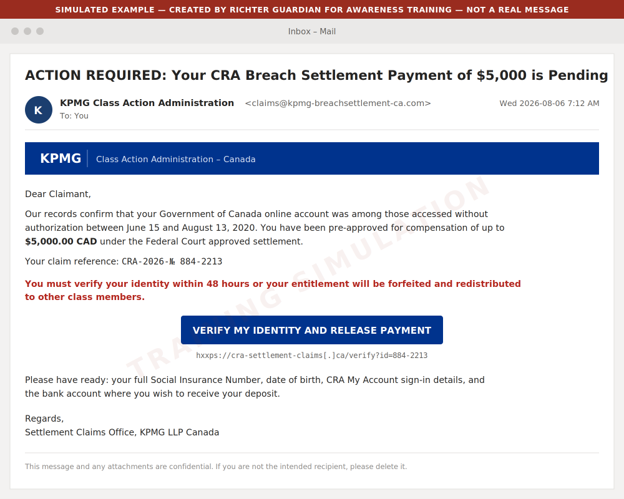
Example 1: Phishing email impersonating the claims administrator

What to watch for
- Look-alike sender domain rather than https://www.breachsettlementcanada.kpmg.ca
- A pre-approved dollar figure the real administrator would never quote up front
- A 48 hour forfeiture threat against a deadline that is actually February 3, 2027
- A request for the full SIN
- CRA sign-in details
- Banking information
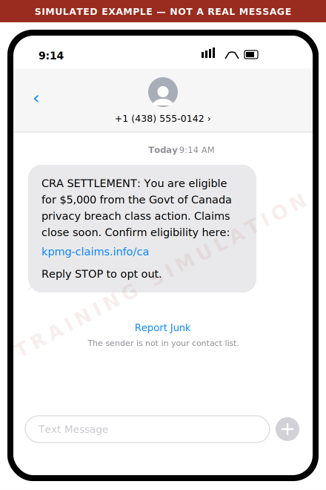
Example 2: Smishing text message

What to watch for
- The administrator does not solicit claims by text message
- The domain is not kpmg.ca
- The amount is presented as guaranteed
- Urgency is manufactured
Legitimate class action notice arrives by mail or from the administrator's own address.
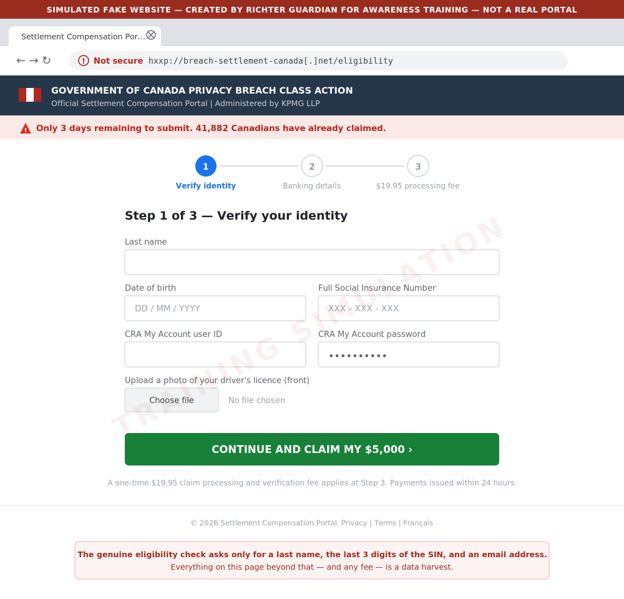
Example 3: Fake eligibility and claim portal

What to watch for
- An unencrypted look-alike domain
- A full SIN and CRA credentials requested where the real site asks only for a last name
- Three SIN digits
- An email address
- An ID upload
- A processing fee where the real claim is free
- False scarcity counters
Criminals also buy sponsored search advertisements so these pages appear above the real one.
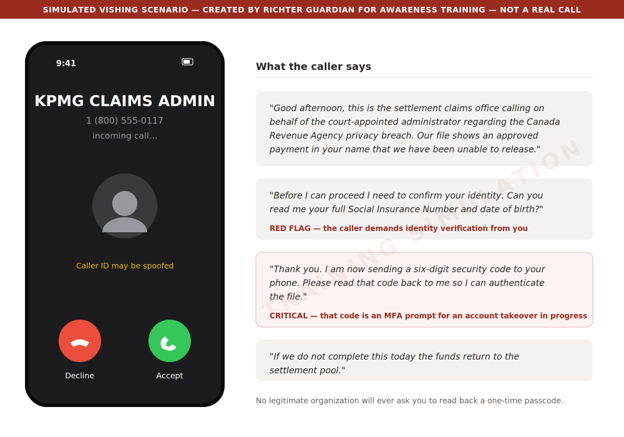
Example 4: Voice call and voicemail pre-text

What to watch for
- An inbound unsolicited call
- Identity verification demanded by the caller rather than by you
- Above all, a request to read back a code sent to your phone. That code is a multi factor authentication (MFA) prompt for an account the caller is trying to take over at that moment. No legitimate organization will ever ask for it
Example 5: Social media and search advertising

What to watch for
- An invented average payout
- A fabricated deadline
- A paid placement above the genuine result
Reach the administrator by typing the address directly - https://www.breachsettlementcanada.kpmg.ca - rather than by clicking any advertisement or search result.
Red flags to brief your household and staff on
Unsolicited contact
The administrator contacts class members by mail or from its own domain. It will not cold call, text, or direct message you.
A guaranteed amount up front
Real compensation is up to $80 or up to $200 for time spent, plus up to $5,000 in documented out of pocket costs, and amounts may be reduced depending on how many claims are approved. Nobody can promise you $5,000.
Artificial urgency
The real deadline is February 3, 2027. Any message giving you 24 hours, 48 hours, or "this week" is manufacturing pressure.
Over collection of identity data
The genuine eligibility check asks for a last name, the last three digits of your SIN, and an email address. A request for the full SIN, date of birth, ID scans, or CRA credentials is a data harvest.
Any request for a fee
Filing a claim is free. A processing, verification, or expedite fee means fraud.
Any request for a code
A one time passcode read aloud, forwarded, or typed into a third party site hands over your account.
Look-alike domains
Check the address carefully. The genuine site is https://www.breachsettlementcanada.kpmg.ca.
Anything ending in .info, .net, .co, .ca-claims, or a hyphenated variant of the KPMG name is not it.
Payment by unusual method
Requests to move funds, buy gift cards, or receive a payout through e-transfer to a new recipient are not part of any settlement.
What we recommend you do
For principals and family members
Type the address, never click
Reach the eligibility check only by typing https://www.breachsettlementcanada.kpmg.ca into the web browser. Do not use links from email, text, social media, or search advertisements.
Verify by calling back
If someone claims to be the administrator, hang up and contact breachsettlementcanada@kpmg.ca from the details on the official site.
Treat the SIN as a credential
Never provide a full Social Insurance Number to an inbound contact.
Check your CRA account directly
Sign in to CRA My Account by typing the address, confirm your direct deposit details and mailing address have not been changed, and enable multi factor authentication if it is not already on.
Consider a credit file alert
If you believe your information was exposed, place a fraud alert with Equifax Canada and TransUnion Canada.
For family offices and business staff
Brief your team this week
Forward or print this email to anyone who handles correspondence, banking, or tax filings on a principal's behalf.
Add a verification step
Any instruction arising from a settlement, refund, or government notice must be verified by an out of band call to a known number before any data or funds move.
Watch for lookalike domains
Ask your IT provider to monitor for newly registered domains that combine your family or firm name with settlement, claim, refund, or CRA terms.
Tune your email filtering
Quarantine newly registered sender domains and flag external mail referencing CRA settlements or class action payouts.
Report and preserve
Report suspected scams to the Canadian Anti-Fraud Centre at 1-888-495-8501 and preserve the original message headers rather than deleting them.
If you think you've already been caught
Move quickly
Change the password on any account whose credentials were entered, starting with CRA My Account and your email, and revoke active sessions.
Call the CRA
If CRA credentials were disclosed, contact the CRA immediately and ask that the account be locked and reviewed for changes to direct deposit or address.
Notify your bank
Report the exposure and ask for enhanced verification on outbound payments.
File a credit alert
Contact Equifax Canada and TransUnion Canada.
Contact Richter Guardian
Speak to your Richter Guardian team. We can help contain the incident, assess what was exposed, and coordinate monitoring.
Ready to stay protected from digital threats, with experienced professionals overseeing your security?
Request a private consultation to find out whether Richter Guardian is a good fit for you.

Why Richter Guardian's Digital Executive Protection Works Like a Home Security System
Most families already understand physical home security. A monitored home security system watches the doors, the windows, and the driveway, and it alerts a real person the moment something looks wrong.
Few high-net-worth families would consider their primary residence unprotected in this way.
Yet the equivalent protection is often missing for the digital side of an executive's family life, where far more of their exposure now lives: within personal email accounts, mobile phones, computers, social media profiles, and financial credentials.
Richter Guardian is built around the same underlying idea as a home security system, just applied to a family's digital footprint.
It is worth walking through the comparison directly, because it makes clear what "protection" should include.
Sensors on every door and window, not just the front entrance
A home security system is only as strong as the size of its coverage. A system that only watches the front door leaves every other entry point open. This is why home security systems place sensors on every window, every door, and often the garage too.
Richter Guardian applies this same principle to an executive's digital life on the home and family front. Personal digital protection means every meaningful entry point is covered, not just the obvious one. This includes:
- Personal laptops, tablets and phones, which are frequently the least protected devices in a household.
- Personal and family email accounts, often the single most valuable target since they often double as the recovery method for banking and investment accounts.
- Social media accounts, which can be cloned or impersonated to reach family members, friends, or staff.
Just as an unmonitored side window undermines a home security system's front-door sensor, one unprotected personal device or account can undermine protection everywhere else.
24/7 monitoring, not a sign in the yard
A home security sign discourages some opportunistic activity, but it does not stop a determined intruder, and it certainly does not respond to one.
The value of a real home security system comes from continuous monitoring: sensors that are always active and a monitoring center that is always watching.
The digital equivalent is continuous monitoring for leaked credentials, impersonation, and malware:
- A stolen password sitting on the dark web is like a duplicated house key sitting in a stranger's pocket. It does nothing on its own, but it becomes dangerous the moment someone decides to use it.
- Ongoing dark web and credential monitoring means that exposure is caught before it turns into a break-in, rather than being discovered only after money or data is already gone.
Monitoring that connects you with a real person, not just an app that pings you
When a home alarm is triggered, the value isn't only the alert. It's what happens next.
A monitoring centre verifies the situation and, if needed, contacts emergency services on the homeowner's behalf. Compare that to a security system that simply sends a phone notification and leaves the resident to figure out what to do.
With Richter Guardian, when an issue arises or clarification is required, our concierge support team contacts you in a secure, private and discreet manner. You can also contact us at any time. Either way, communication takes place through the Guardian mobile app, a phone call, or another agreed-upon channel.
Our Guardian professionals, also known as the Cyber Defence Desk, explain what’s happening in clear language and guide next steps in a way that fits into your broader wealth and risk strategies.
This matters most in the moment it's needed: when there's a convincing call, a strange pop-up, or an unexpected wire request.
When you know exactly who to speak with, and have those questions be answered by a real person, is the difference between a contained incident and a costly one.
Motion sensors around the perimeter, not just the locks
Good home security doesn't rely on locks alone. It adds motion sensors, cameras, and perimeter alerts, so that suspicious activity is noticed even if no door has actually been breached yet.
The digital version of this is reputation and identity protection. A cloned social media profile or an impersonation attempt is a form of activity around the perimeter of a family's digital life, well before any account can be compromised.
Monitoring for that activity, and acting on it early, is what keeps a small warning sign from becoming a full-blown incident involving fraud or reputational harm.
Covering every household under one family's roof, not just one address
Here is where the comparison becomes especially important for high-net-worth families with more than one residence, or with members living in different homes altogether.
A homeowner with a vacation property, or an adult child in a separate residence, would not consider that second home "covered" by the security system installed at the primary address. Each home needs its own protection.
The same is true digitally, and it is often overlooked.
A family's digital exposure does not stop at one address. It follows every family member:
- the adult child at university;
- the parent living independently; and
- the staff working across more than one property.
Each of these people and their accounts and devices represents a separate point of exposure, and each needs to be covered on its own, not assumed to be safe because "the family" has security somewhere.
This is why Richter Guardian's approach extends coverage across the full footprint of a family, not just one principal or one property.
Extended visibility across multiple households means that a family member living somewhere else entirely is not left outside the perimeter simply because they aren't under the same roof.
The value of thinking about digital executive protection this way
None of this is meant to suggest that digital executive protection and home security are the same thing, because they aren't.
The underlying logic that makes a home security system worth having is exactly the logic that should apply to a family's digital exposure: full coverage, continuous monitoring, a real response when something goes wrong, and protection that follows every member of the family, not just one address.
Families who wouldn't leave a single window unmonitored at home are, in many cases, leaving several digital windows wide open without realizing it.
Ready to stay protected from digital threats, with experienced professionals overseeing your security?
Request a private consultation to find out whether Richter Guardian is a good fit for you.
Browse by topic
Explore articles based on areas of risk and responsibility.
Latest articles
New articles and updates from the Richter Guardian team.

Why Regular Software Updates Are Essential for Strengthening Cybersecurity
Introduction
As technology rapidly advances, so do the threats to business security, underscoring the critical importance of regular software updates. Cyber-attacks are becoming increasingly sophisticated and widespread, posing significant risks to organizations of all sizes. To defend against these malicious threats, businesses must prioritize keeping their software up to date.
Software updates not only introduce new features but also provide essential security patches to address potential vulnerabilities. Failing to update can leave individuals and businesses exposed to cyber breaches, data theft, and financial loss. Given the growing reliance on technology for daily operations, maintaining strong security measures is more important than ever.
Regular software updates are a crucial line of defense against cyber threats, making it imperative for businesses to stay current to protect their data, customers, and reputation.
How can I check if my software is up-to-date?
You can check if your device’s software is up to date by going into the device’s settings and looking for the “software update” option. Here’s how to do it on different types of devices:
- On Apple devices (iPhone, iPad): Go to Settings > General > Software Update to see if any updates are available.
- On Android devices (like Samsung Galaxy): Go to Settings and tap on Software Update or System Update. The exact location may vary depending on the model, but it’s usually found in the main settings menu.
- On Windows devices: Go to Settings and find the Windows Update section. From there, click Check for updates to see if your system needs an update.
- On macOS (iMac, MacBook): From the Apple menu n the corner of your screen, choose System Settings. Click General in the sidebar of the window that opens, then click Software Update on the right.
Whenever possible, activate automatic updates to receive the latest patches immediately upon release.
Ready to stay protected from digital threats, with experienced professionals overseeing your security?
Request a private consultation to find out whether Richter Guardian is a good fit for you.

Potential Concern with Apple's New NameDrop Feature
Introduction
In Early November, Apple released ‘NameDrop’ as part of the iOS 17.1 operating system update. NameDrop allows users to share saved contacts between other newer iPhones or Apple Watches within an inch of each other. While the prompt must be accepted to share contact information, several law enforcement agencies recommend parents to change this feature for children.
Summary of the incident
The ‘NameDrop’ feature is similar to Apple’s AirDrop functionality. When NameDrop is enabled, two iPhone users can activate the feature by holding the top ends of their iPhones together. After that, the users can tap ‘Share’ or ‘Receive Only’. The NameDrop feature is automatically enabled once a user updates to iOS 17.1.
While the feature itself is not a threat, law enforcement agencies are concerned that the feature puts children at a bigger risk with connecting to strangers. Children may not be completely aware when accepting a new ‘Share’ or ‘Receive Only’ prompt. Police recommend turning the feature off for children once they upgrade to iOS 17.1.
Recommendations
- Turn the ‘NameDrop’ Feature Off for Children – It is good practice to upgrade your iPhone devices to the latest operating system update. The latest operating system update will include ‘NameDrop’ and automatically enable the feature. To turn off the NameDrop feature, complete the following:
Navigate to iPhone Settings > General > Airdrop > Bringing Devices Together > Off.
Ready to stay protected from digital threats, with experienced professionals overseeing your security?
Request a private consultation to find out whether Richter Guardian is a good fit for you.

FBI Notice Spike in Compromised Government Emails Conducting Fake EDRs
Introduction
In early November, the Federal Bureau of Investigation (FBI) issued a warning regarding the abuse of compromised email accounts from U.S. and foreign government entities. These compromised accounts are being exploited to execute fraudulent Emergency Data Requests (EDRs) aimed at U.S.-based service providers.
What is an EDR?
An EDR is a legal mechanism enabling U.S. law enforcement agencies to urgently request confidential data from service providers without a subpoena. Threat actors would take advantage of the procedure by using compromised government email addresses to submit fraudulent EDRs and obtain customer data.
For example, Verizon disclosed that it received over 127,000 law enforcement requests for customer data during the second half of 2023, with more than 36,000 classified as EDRs. The company reported fulfilling approximately 90% of these requests.
How do threat actors execute these schemes?
Investigations into cybercrime forums reveal multiple methods used by threat actors to submit fraudulent EDRs. Some fake EDR vendors sell the capability to generate fake EDRs by targeting specific platforms, complete with counterfeit court documents. Other fake EDR vendors simply sell access to compromised government or law enforcement email accounts.
Key tactics used to compromise government or law enforcement email accounts include:
- Phishing and malware campaigns targeting email users.
- Purchase of stolen credentials from dark web marketplaces.
- Exploitation of poor cyber practices among government employees.
Key lessons
The notice serves as a reminder of the dangers posed by the sophistication of scams threat actors can orchestrate once they have access to compromised credentials.
To mitigate risks, organizations and individuals must prioritize cybersecurity hygiene:
- Establish a procedure on handling sensitive emails to avoid getting phished; approach urgent emails or emails with attachments with caution.
- Employ unique and strong passwords for every account and use multi-factor authentication when possible. Data breaches happen often, and threat actors like to take the compromised credentials from these breaches to re-use on other websites.
Ready to stay protected from digital threats, with experienced professionals overseeing your security?
Request a private consultation to find out whether Richter Guardian is a good fit for you.

Why Authenticator Apps Are Safer Than SMS for Login Security
Introduction
One of the best ways to add extra security to your accounts is through Multi-Factor Authentication (MFA) – this means you need more than just a user ID and password to log in. We strongly recommend using MFA for your important accounts.
However, not all MFA methods are equally secure. Authenticator apps are a safer option than SMS authentication methods because they generate security codes directly on your device. SMS authentication codes, on the other hand, can be intercepted by hackers.
What is Multi-Factor Authentication and what is the benefit?
MFA adds an extra step to logging in. Instead of just entering a user ID and password, you must also provide another piece of information, like a code from an app or a text message. This extra step makes it much harder for hackers to break into your account, even if they steal your password.
MFA method #1: What is an authenticator application?
An authenticator app is a mobile app that generates security codes for logging in. These codes are called Time-Based One-Time Passwords (TOTP) and change every 30 to 60 seconds.
When you set up an authenticator app for an account, you scan a QR code or enter a secret key. This links the authenticator app to your account and allows it to generate matching codes.
To log in, you enter your username, password, and the current code displayed on your authenticator app. If the code matches the one your account server expects, you get access.
Some popular authenticator applications include:
- Google Authenticator
- Microsoft Authenticator
- Authy
- Duo Mobile
MFA method #2: What is SMS authentication?
SMS authentication is when a security code is sent to your phone via text message. You enter this code along with your user ID and password to log in. These codes are One-Time Passwords (OTP) which are generated for one-time use. OTPs can last for a specified amount of time – users will need to generate a new OTP if they exceed the time limit.
Sometimes, websites may also send security codes via email instead of SMS, but the process is the same.
Why authenticator applications are preferred over SMS authentication
Authenticator apps provide better security than SMS codes for several reasons:
- Less chance of being hacked: Authenticator apps generate codes directly on your device, while SMS codes are sent over the internet and can be stolen.
- No risk of SIM swapping: Hackers can trick your phone provider into transferring your number to a new SIM card, allowing them to receive your SMS codes.
- No risk of interception: SMS codes can be stolen using man-in-the-middle attacks, where hackers eavesdrop on internet traffic.
- Codes change frequently: Authenticator apps refresh their codes every 30 to 60 seconds, making them harder to steal and use.
How hackers can steal SMS codes
Here are two common ways cybercriminals can steal SMS codes:
- Man-in-the-Middle Attacks – Hackers intercept your internet traffic when you connect to an unprotected Wi-Fi network (like public Wi-Fi at a coffee shop). This can let them steal SMS codes.
- SIM Swapping – A hacker contacts your mobile provider pretending to be you and tricks them into activating a new SIM card with your phone number. Now, they receive all your text messages, including your security codes.
How to keep your accounts safe
- Use an authenticator app instead of SMS authentication whenever possible.
- Protect your phone with a strong PIN or password.
- Avoid using public Wi-Fi when entering security codes.
- Never share your security codes with anyone.
- Be cautious of phishing scams that try to trick you into revealing your codes.
Ready to stay protected from digital threats, with experienced professionals overseeing your security?
Request a private consultation to find out whether Richter Guardian is a good fit for you.
%20(1).png)
Have questions after reading?
If something you’ve read raises a concern, our team can help you understand how it applies to you. Richter Guardian provides ongoing monitoring and expert support for individuals, families, and leadership teams.
- Clear visibility into personal digital risk
- Guidance from experienced cybersecurity professionals
- Support designed for both private clients and enterprise leadership
%20(1).avif)
.png)